
Skip to content
SUBSCRIBE
  • Technology
    download 50
    Technology
    New security threats demand new solutions
    July 9, 2025
    Saurav Dhawale
    No posts found
    photo (2)
    Technology
    CIO Business Value Guide
    Turn your data into dollars
    Technology
    Turn your data into dollars
    download - 2025-07-11T161749
    Technology
    SAN-Optimized Storage for Critical Enterprise Applications
    No posts found
    View All
  • HRTech
    Lifecycle Pricing Market Snapshot 2024
    Hrtech
    Grocery & C-Store: Lifecycle Pricing Market Snapshot 2024
    January 29, 2026
    Saurav Dhawale
    No posts found
    Centralized Overview of School Operations
    Hrtech
    Centralized Overview of School Operations
    The Slack handbook for sales teams
    Hrtech
    The Slack handbook for sales teams
    Reduce Licensing Costs and Modernize Enterprise Workloads
    Hrtech
    Reduce Licensing Costs and Modernize Enterprise Workloads
    No posts found
    View All
  • Finance
    2023 Executive Survey
    Finance
    2023 Executive Survey: The power of mobilizing the boundless workforce
    January 22, 2026
    Saurav Dhawale
    No posts found
    download 15
    Finance
    The state of AI-powered business transformation in banking
    download5
    Finance
    Smart Academic Management – Simplify, Automate, and Enhance Learning
    THE PLATFORM WITH UNMATCHED FUNCTIONALITY FIS® Payments One Credit
    Finance
    THE PLATFORM WITH UNMATCHED FUNCTIONALITY FIS® Payments One Credit
    No posts found
    View All
  • Marketing
    How to Measure Behavior
    Marketing
    How to Measure Behavior
    January 30, 2026
    Saurav Dhawale
    No posts found
    download 18
    Marketing
    The state of retail operations
    How-B2B-Tech-Publishers-Can-Use-Google-Ads-to-Boost-Lead-Quality
    Analytics
    How B2B Tech Publishers Can Use Google Ads to Boost Lead Quality
    The Wise Guide: The Do’s and Don’ts of Data Storage From Our Customers Point of View
    Marketing
    The Wise Guide: The Do’s and Don’ts of Data Storage From Our Customers Point of View
    No posts found
    View All
  • Resources
    • Web Development
    • Technology 2025
    • Supply Chain
    • Storage
    • Security
    • Networking And Communication
    • MSP
    • Library
    • IT Security
    • IT Management
    • IT Infrastructure
    • IOT
    • Global Trade
    • Stock Market
    • Insurances
    • Banking
    • Finance 2025
    • ERP
    • Ecommerce
    • Ebook
    • Digital Advertising
    • Data Security
    • Data Management
    • Content Marketing
    • Cloud Migration
    • Cloud Computing
    • Big Data
    • B2B Marketing
    • Audit And Compliance
    • Artificial Intelligence
    • Application Development
    • API
    • Analytics
    • Abm Marketing
  • Contact
  • About
    • Privacy Policy
    • Terms of Use
    • Cookies Notice
  • work-with-us
    • Advertise With-Us
  • Technology
    download (62)
    Technology
    IDC MarketScape: Worldwide Managed Detection and Response 2024 Vendor Assessment
    July 8, 2025
    Saurav Dhawale
    No posts found
    Reimagine Retail and Consumer Goods Innovation with Generative AI
    Technology
    Reimagine Retail and Consumer Goods Innovation with Generative AI
    Proteger la cuarta revolución industrial
    Technology
    Proteger la cuarta revolucin industrial
    download - 2025-07-11T150532
    Technology
    Review Hybrid Cloud Management Tools From Google, Azure, AWS, and more
    No posts found
    View All
  • HRTech
    Navigating the VDI Landscape: A Strategic Guide Post-VMware Acquisition
    Hrtech
    Navigating the VDI Landscape: A Strategic Guide Post-VMware Acquisition
    January 28, 2026
    Saurav Dhawale
    No posts found
    How to design accessible products
    Hrtech
    How to design accessible products
    Tactical Buyers Guide: All-Flash SAN Storage for the Hybrid Cloud
    Hrtech
    Tactical Buyers Guide: All-Flash SAN Storage for the Hybrid Cloud
    download 20
    Hrtech
    The SUSE Guide to Edge Computing in a Cloud Native World 2022
    No posts found
    View All
  • Finance
    COMPREHENSIVE GUIDE TO SECURITY OPERATIONS
    Finance
    Comprehensive Guide to Security Operations
    January 21, 2026
    Saurav Dhawale
    No posts found
    A step-by-step guide to becoming a data-first organization
    Finance
    A step-by-step guide to becoming a data-first organization
    download-2 (1)
    Finance
    Complex Tax Calculations With a Single Source of Truth: Increase Agility With Longview Tax and Reduce Risk
    5 Key Elements of a Data-driven Culture
    Finance
    5 Key Elements of a Data-driven Culture
    No posts found
    View All
  • Marketing
    Die Hybrid Cloud wird zum Standard. Wie entscheiden Sie, was Sie wo ausfhren?
    Marketing
    Die Hybrid Cloud wird zum Standard. Wie entscheiden Sie, was Sie wo ausfhren?
    January 21, 2026
    Saurav Dhawale
    No posts found
    VDI: The Answer to Safeguarding the Economic Value of R&D Breakthroughs in Pharmaceutical
    Marketing
    VDI: The Answer to Safeguarding the Economic Value of R&D Breakthroughs in Pharmaceutical
    lucid-origin_Image_Prompt_Deep_Reddish_Agentic_Marketing_Tools_Theme_A_highly_creative_deep_r-0
    Marketing
    10 Best Agentic Marketing Tools to Automate Smarter Campaigns
    Reimagine the Employee Experience: A Guide for Public Sector Organizations
    Marketing
    Reimagine the Employee Experience: A Guide for Public Sector Organizations
    No posts found
    View All
  • Resources
    • Web Development
    • Technology 2025
    • Supply Chain
    • Storage
    • Security
    • Networking And Communication
    • MSP
    • Library
    • IT Security
    • IT Management
    • IT Infrastructure
    • IOT
    • Global Trade
    • Stock Market
    • Insurances
    • Banking
    • Finance 2025
    • ERP
    • Ecommerce
    • Ebook
    • Digital Advertising
    • Data Security
    • Data Management
    • Content Marketing
    • Cloud Migration
    • Cloud Computing
    • Big Data
    • B2B Marketing
    • Audit And Compliance
    • Artificial Intelligence
    • Application Development
    • API
    • Analytics
    • Abm Marketing
  • Contact
  • About
    • Privacy Policy
    • Terms of Use
    • Cookies Notice
  • work-with-us
    • Advertise With-Us
Home » Automation
Category:

Automation

Automation

How Is AI Used in Marketing Automation and Campaigns?

by ailcia sierra August 4, 2026
written by ailcia sierra

AI is changing the way companies do marketing fast by using marketing automation . This is especially true for things like making marketing campaigns work automatically and managing them. Companies are not just using people to do things or old automation tools. They are using AI systems to make marketing campaigns that’re smarter and work better.

Artificial Intelligence is used for lots of things like email marketing and ads on media. It is also used to group customers together. Make campaigns work better. Artificial Intelligence is changing how people who do marketing plan things make them happen and make them better. It helps companies understand what customers do what they might do next and give them the information at the right time.

Nowadays companies that use AI to make marketing campaigns work automatically are doing a lot better, than others. They are getting more people to pay attention turning people into customers and making more money from what they spend on marketing. Artificial Intelligence is really helping these companies in a way.

What Is AI in Marketing Automation?

AI in marketing automation is, about using machine learning and data to make marketing tasks easier and better.

Traditional automation uses set rules. Artificial Intelligence learns from data and gets better over time. It looks at how customers behave guesses what might happen and makes decisions without needing people to constantly tell it what to do.

What Is AI in Marketing Automation?

Here are some examples:

  • Personalized email campaigns
  • Automated ad targeting
  • Customer journey mapping
  • Content generation
  • Predictive analytics

AI makes marketing automation more dynamic, adaptive, and efficient.

How AI Is Used in Marketing Automation and Campaigns

1. Customer Segmentation and Targeting

One of the powerful uses of Artificial Intelligence in marketing is customer segmentation. Of grouping users based only on age, gender or location Artificial Intelligence analyzes deeper behavioral patterns such as browsing history, purchase behavior, engagement level and intent signals from the customers.

This allows marketers to create specific audience groups for the marketing campaigns. As a result the marketing campaigns become more relevant and effective leading to conversion rates for the business.

For example AI can identify customers who’re likely to purchase within a week and target them with personalized offers that are tailored to the customers.

2. Personalized Campaign Creation

AI enables hyper-personalization in the marketing campaigns. It helps brands deliver customized messages, product recommendations and offers based on individual user behavior of the customers.

Of sending the same email to all the customers, Artificial Intelligence tools can generate different versions of content tailored to each user segment of the customers.

This personalization increases engagement because the customers feel the content is relevant to their needs and interests as customers.

3. AI-Powered Email Marketing

Email marketing remains one of the effective digital channels and Artificial Intelligence has made it even more powerful for the marketers.

AI helps optimize the following things:

  • lines of the emails
  • Email timing for the customers
  • Content structure of the emails
  • Call-to-action placement in the emails

It also predicts the time to send emails to each user based on past behavior of the customers improving open rates and click-through rates for the emails.

AI can also automate email sequences for lead nurturing ensuring the customers receive the message at each stage of the journey, as customers.

4. Predictive Analytics for Campaign Performance

Predictive analytics is a deal for marketing automation. It looks at what happened in the past to figure out what will happen next.

Marketers can use it to predict things like:

  • Customer lifetime value
  • Conversion probability
  • Campaign success rate
  • Churn risk

This helps companies use their money wisely and focus on the things that will make them the most money.

Marketers do not have to guess. They can make decisions based on data and be more accurate.

How AI Is Used in Marketing Automation and Campaigns
5. Real-Time Campaign Optimization

Artificial intelligence is always watching how campaigns are doing and making changes on the fly to get results.

It can do things like:

  • Adjust ad bids
  • Change targeting parameters
  • Optimize creative elements
  • Pause underperforming ads

This means campaigns are always doing their best without someone having to check on them all the time.

It helps companies not waste money on ads and get a return on their investment.

6. Content Generation for Marketing Campaigns

AI tools can make a lot of marketing content quickly. This includes things like:

  • Ad copy
  • Social media posts
  • Outlines for blog posts
  • Content for landing pages
  • Descriptions of products

This saves time. Makes sure all the content looks the same.

Marketers can try out versions of content to see what works best.

7. AI in Social Media Marketing

Social media campaigns are getting better with intelligence. AI tools look at how people interacting with content and suggest the best ways to post it.

They also help with things like:

  • Scheduling posts automatically
  • Identifying trending topics
  • Analyzing engagement performance
  • Managing social interactions

This helps companies be seen and liked by more people on social media platforms.

AI makes social media marketing easier and more effective for companies, like Marketing Campaigns and AI.

AI vs Traditional Marketing Automation
FeatureTraditional AutomationAI-Powered Automation
Decision MakingRule-basedData-driven
PersonalizationLimitedAdvanced
OptimizationManualReal-time
Content CreationHuman-onlyAI-assisted
PredictionNot availablePredictive analytics

Benefits of AI in Marketing Automation

AI offers several advantages that improve overall marketing performance. One major benefit is increased efficiency. AI reduces manual workload by automating repetitive tasks, allowing marketers to focus on strategy and creativity.

Another benefit is improved personalization. Customers receive content that matches their interests, leading to higher engagement and conversions. AI also improves ROI by optimizing campaigns in real time and reducing wasted ad spend. Additionally, it enhances decision-making by providing actionable insights based on data.

Overall, AI helps businesses scale marketing efforts without increasing operational complexity.

Important Use Cases in Real-World Marketing

AI is widely used across different marketing channels.

In digital advertising, AI optimizes ad targeting and bidding strategies. In email marketing, it personalizes communication and improves open rates. In content marketing, it helps generate ideas and draft content faster.

Ecommerce businesses use AI to recommend products, while SaaS companies use it for lead scoring and customer onboarding. These use cases demonstrate how AI is becoming essential across industries.

AI-Powered Lead Scoring and Qualification

AI is really good at helping with lead scoring and qualification. It looks at how people behave what they do and what they are interested in to find the leads. This means that the sales and marketing people can focus on the leads that’re most likely to buy something, which makes everything more efficient and effective.

AI-Powered Lead Scoring and Qualification

Making Sense of the Customer Journey with AI

Understanding what the customer does is very important in marketing today. AI helps us see what the customer does by looking at all the places they interact with us like our website, emails, ads and social media. It finds the places where people stop interacting with us and helps us make those places better more people will buy something. This makes it easier for people to use our website and helps our marketing campaigns work better.

AI Chatbots are Good at Getting People Engaged

AI chatbots are becoming a part of marketing campaigns. They talk to people in time answer their questions suggest products and help them buy something. These chatbots work all the time, which means people can get help whenever they need it. We can respond to them faster. They also help us get leads from the conversations they have with people.

AI Makes Ad Creatives Better

AI is changing the way we make ads. It can make different versions of an ad and then see which one works best. This means we can make our ads better and better without having to do a lot of work. It makes our ads work efficiently and helps us get a better return on our investment.

AI Helps with Marketing Analytics and Reporting

AI makes it easier to understand marketing data. It looks at all the information. Makes reports and insights, for us. It finds patterns and trends. Helps us see where we can improve. Of having to look at a lot of spreadsheets we can get the information we need quickly which helps us make good decisions faster. AI and marketing analytics are a combination because AI helps us understand what the marketing data means.

Challenges of AI in Marketing Automation

There are some problems with using AI in marketing automation.

One big issue is data privacy. AI needs a lot of customer information to work well. So companies have to make sure they follow the rules about keeping customer data private.

Another problem is that AI tools do not always work well with computer systems. Many companies use systems that are not easy to fix.

There is also a risk of relying much on machines. If marketing becomes too automated it can lose the touch that humans bring. AI models need to be trained. Checked all the time to make sure they are accurate.

Future of AI in Marketing Automation

The future of marketing automation is closely tied to how AI develops. In the few years AI will get even smarter and more independent.

Here are some things we can expect:

  • automated marketing campaigns
  • AI-generated creative design systems
  • Personalized customer journeys in real-time
  • Voice-based marketing automation
  • Predictive campaign building

Marketing will become more efficient, personalized and based on data than before.

Companies that start using AI will have a big advantage, in reaching and converting customers.

Conclusion

AI is changing how marketing automation and campaigns work. It is making marketing faster smarter and more personalized.

AI is helping businesses improve performance at every stage of the marketing funnel. This includes customer segmentation, predictive analytics, time optimization and content generation.

As technology keeps evolving AI will become a part of every marketing strategy. Companies that adopt AI will be better positioned to increase engagement improve conversions and maximize ROI in the economy.


August 4, 2026 0 comment
0 FacebookTwitterPinterestEmail
Automation Tools
Automation

Best Automation Tools for Small Businesses (No Paid Ads Needed)

by ailcia sierra August 1, 2026
written by ailcia sierra

Running a business can be tough. You have to do everything from managing leads to following up with customers. This takes a lot of time. Small business owners often get stuck doing the things over and over again. These tasks take up a lot of time and energy.

The good thing is that you do not need to be a company to use automation. Now small businesses can use free automation tools to make their work easier save time and make money. You can do all of this without paying for ads or expensive software.

Automation is not about getting things done faster. It is about working in a way. When you use automation correctly your small team can handle tasks that you do every day. You can talk to your leads regularly track how you are doing and focus on things that help your business grow. The best thing is that you do not need a lot of money or to be good with technology to use automation.

In this guide we will talk about the free automation tools for small businesses like yours. We will show you how to use each tool step by step. We will give you examples of businesses that are using these tools. We will also give you tips on how to make automation workflow for you. By the time you finish reading this guide you will know how to set up automated workflows be more productive and do manual work. You can do all of this without spending any money on paid tools.

We will explore automation tools, for small businesses. We will describe how to use each free automation tool. We will provide examples of businesses using these free automation tools. We will share tips to make these free automation tools work for your business.

Why Small Businesses Should Automate

Why Small Businesses Should Automate

Automation is not something that small businesses can just have if they want to. It is something that they really need to have if they want to grow in a way that will last. Here is why Small Businesses Should Automate:

  • Time-Saving: Small Businesses can automate tasks like sending follow-up emails to customers updating records and scheduling social media posts for Businesses. This gives Businesses back hours of work that they can use for other things.
  • Accuracy: When Small Businesses automate tasks, they can be sure that every task will happen on time and will be done correctly which means there will be mistakes made by people.
  • Improved Productivity: When tasks are automated for Small Businesses, the teams that work for Businesses can focus on work that is creative and involves making plans instead of just doing the same tasks over and over.
  • Cost-Effective Growth: There are tools that Small Businesses can use for free that can handle tasks that Small Businesses would otherwise have to hire more people to do or buy expensive software to do.
  • Scalable Processes: As Small Businesses grow and get bigger the automated systems that Small Businesses have in place can handle the increased amount of work without needing any effort from Small Businesses.

Small Businesses that use automation can stay competitive with businesses respond faster to customers of Small Businesses and focus on the areas of their business that will help them grow in the long run instead of just focusing on the day-, to-day work of Small Businesses.

Benefits of Using Automation Tools:

BenefitHow It Helps
Saves TimeAutomates repetitive tasks like emails and notifications
Improves AccuracyReduces human errors in tasks like data entry
Boosts ProductivityFrees employees to focus on revenue-generating work
Enhances Customer ExperienceEnsures timely responses and follow-ups
Scalable OperationsHandles growing business processes effortlessly

How to Choose the Right Automation Tool?

To pick the automation tool you need to know what your business needs. Think about this:

  • What tasks take up most of your time?
  • What tasks do you do over and over that always follow the rules?
  • Where do you make mistakes the most?.
  • What work can be automated without needing to be a tech expert?

When you figure out these things you can look at the AUTOMATION TOOLS Choose the ones that fit your needs. This way you can get the most out of the automation tool. It will really make a difference, for your business and the automation tool.

Top Free Automation Tools for Businesses:

I want to tell you about the best free automation tools for small businesses. These are the tools that small businesses can use for free, without having to pay for any advertisements.

1. HubSpot Free CRM. It Helps You Manage Your Leads:

The HubSpot Free CRM is a tool that helps people who own businesses keep track of the people they talk to manage the sales process send follow-up emails automatically and see how their sales are doing. The HubSpot Free CRM is easy to use, for people who are just starting out and you do not need to know how to code.

The HubSpot Free CRM is best for:

  • Managing. The people you talk to
  • Sending follow-up emails
  • Automating the sales process

The main features of the HubSpot Free CRM are:

  • You can see a timeline of all the things that have happened with a contact
  • The HubSpot Free CRM can automatically send follow-up emails for you
  • You can make templates for your emails
  • You can see how your deals are doing on a dashboard

Here is how you can set it up:

  • First you need to sign up for the HubSpot Free CRM.
  • Then you need to add all the people you talk to into the HubSpot Free CRM.
  • Next you make email templates that the HubSpot Free CRM can use to send follow-up emails.
  • After that you set reminders and follow-ups.
  • Finally, you can see how your deals are doing. The HubSpot Free CRM can automatically update the status of your deals.

For example, a small company that helps people, with marketing used the HubSpot Free CRM to send follow-up emails. The people they were trying to sell to get emails that were personalized for them and this helped the company get 30 percent more people to buy from them over two months. The HubSpot Free CRM really helped this company manage its leads.

2. MailerLite has a plan that helps you send automated emails:

MailerLites free plan lets you create email campaigns that send automatically. You can use it for drip campaigns group your audience into segments. Send welcome emails.

This is good for:

  • Sending a series of emails one after another
  • Nurturing leads with a sequence of emails
  • Personalizing emails for your subscribers

MailerLite free plan is good, for automation.

Key Features:
FeatureDescriptionBenefit
Email AutomationAutomated sequences based on triggersSaves manual email work
Landing PagesBuild forms to capture leadsConverts website visitors into leads
Subscriber SegmentationGroup leads based on behaviorMore personalized messaging
AnalyticsTrack open and click ratesMeasure campaign performance

Here is what you can do:

  • First you capture a lead through a form.
  • Then a welcome email is sent to the lead automatically.
  • After that you send follow-up emails to the lead at scheduled times.
  • You also segment the subscribers based on how they engage with the emails to make the future messages more personal for the subscribers.

For example, a small SaaS company used MailerLite to set up a three-step email sequence.

This helped the company to nurture the leads automatically.

As a result, the company had a 25 percent increase in trial signups, in one month.

3. Zapier (Free Tier) -Connect Apps and Automate Workflows:

Zapier is a tool that helps you connect lots of apps together. This means that when something happens in one app it can make something happen in another app.

Best For:

  • Linking apps, like Gmail, Sheets, customer relationship management tools and Slack
  • Doing the tasks over and over again but automatically

Here is a real example of how this works:

  • A new person is added to Google Sheets. Then that person automatically gets added to HubSpot.
  • MailerLite sends that person an email.
  • Slack sends a message to the sales team to let them know.

This way you do not have to enter the information into lots of different apps. It also helps make sure that you follow up with people at the time. Zapier does this for you so you can focus on things.

Top Free Automation Tools for Businesses:

4. Google Sheets + Google Forms – Capture and Organize Leads:

Google Forms and Google Sheets are useful tools that can help us automate things.

Best For:

  • Collecting information from people who’re interested in what we do
  • Organizing data without having to do it ourselves
  • Sending information to tools that can help us automate our work

How It Works:

  • We can create a Google Form to get information from people.
  • The information people give us is automatically saved in Google Sheets.
  • Then we can connect Google Sheets to Zapier so it can send automated emails or do tasks for us.

Real Example:

A design studio in our area used Google Forms to get information from people who wanted to work with them.

The information, from Google Forms went into Google Sheets automatically.

Then it triggered emails to go out to those people through MailerLite, which saved the design studio a lot of time every week.

Google Forms and Google Sheets really helped the design studio with their workflow.

5. Trello (Free Version) – Project and Workflow Automation:

Trello helps organize tasks in a way, with boards, lists and cards. It has a free automation tool called Butler that can do tasks for you.

Best For:

  • Team task assignment
  • Managing project workflows
  • Tracking progress

Automation Example:

  • For instance, when you move a card to “Completed” it can automatically update dates and send a notification on Slack.

Real Example:

A small creative agency saved 20% of their project management time by using Trello to automate notifications and update tasks.

The agency used Trello to automate notifications and task updates which helped them save time.

6. Notion (Free Personal Plan) -Templates and Knowledge Management

Best For:

  • SOP documentation
  • Content calendar management
  • Task tracking

For example, when Notion is used to make a copy of a client onboarding template for every client it saves time and makes sure everything is done the same way every time. Notion really helps with this because it lets you make a template one time and then use it for every client. Using Notion for this kind of thing is a help, for small businesses. Notion makes it easy to keep everything organized and consistent.

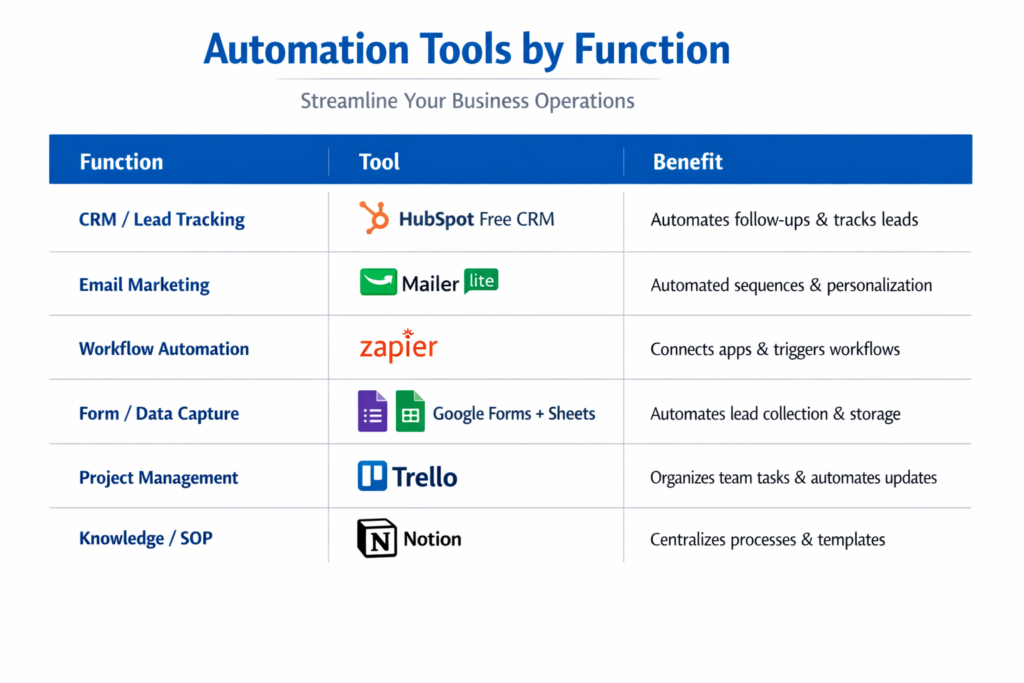
Automation Tools by Function

FunctionToolBenefit
CRM / Lead TrackingHubSpot Free CRMAutomates follow-ups & tracks leads
Email MarketingMailerLiteAutomated sequences & personalization
Workflow AutomationZapierConnects apps & triggers workflows
Form / Data CaptureGoogle Forms + SheetsAutomates lead collection & storage
Project ManagementTrelloOrganizes team tasks & automates updates
Knowledge / SOPNotionCentralizes processes & templates

Step-by-Step Example Workflow: Lead Follow-Up Automation:

Lead Follow-Up Automation is what we are going to talk about.

The main goal is to automate follow-ups for leads so we can get more people to engage with us and turn them into customers.

Best Automation Tools for Small Businesses (No Paid Ads Needed)

We will use a tool to do this:

  • Google Forms
  • Google Sheets
  • Zapier
  • MailerLite

Here is how we do it:

  • Step 1: We create a Google Form to get information from leads.
  • Step 2: When people fill out the form their answers automatically go into Google Sheets.
  • Step 3: Then Zapier tells MailerLite to send an email to the new lead.
  • Step 4: After that MailerLite sends another email to the lead 2 days to follow up.
  • Step 5: We separate the leads, into groups based on how they engage with us so we can plan our future email campaigns better.

Best Practices for Small Business Automation

  • When you are getting started with Small Business Automation start simple. Focus on one workflow at a time for Small Business Automation.
  • You should document all of your processes for Small Business Automation. You can use tools like Notion or Trello to track all of your workflows for Small Business Automation.
  • You need to test all of your workflows for Small Business Automation. Make sure all of the triggers fire correctly and that all of the data flows as you expect it to for Small Business Automation.
  • It is also an idea to monitor your metrics for Small Business Automation. You should track things like email opens and clicks and lead conversions and response times, for Small Business Automation.

Common Mistakes to Avoid:

MistakeEffectSolution
Automating too many processes at onceConfusion & errorsStart small and scale gradually
Ignoring performance trackingLeads not convertingSet KPIs and measure results
Impersonal communicationLower engagementUse personalized fields in emails
No backupsLost automation setupRegularly export data and workflows

Checklist: Are You Ready to Automate Your Small Business?

  • Find tasks you do over. Over
  • Pick free tools that work for you
  • Create a plan for automating tasks
  • Try it out. See if it works
  • Keep an eye, on numbers often
  • Make changes based on how things are going

Conclusion:

For small businesses, automation is no longer just a convenience it has become an essential part of sustainable growth. As your business expands, managing leads, customer communication, marketing campaigns, and daily operations manually can quickly become overwhelming. The right automation tools help simplify these tasks, allowing your team to focus on building relationships, improving products, and serving customers instead of repetitive administrative work.

Platforms such as HubSpot CRM, MailerLite, Trello, Zapier, Google Forms, and Notion make it easier to organize workflows, automate routine tasks, reduce human errors, and improve customer engagement without requiring a large marketing budget. Even simple automations, like sending follow-up emails, assigning tasks automatically, or collecting customer data, can save hours of work every week.

The key is to start with one or two processes, monitor their performance, and continuously optimize them as your business grows. Small improvements made over time can lead to significant gains in productivity, customer satisfaction, and revenue. By embracing business automation today, small businesses can operate more efficiently, make smarter decisions, and achieve long-term growth while keeping costs under control.

August 1, 2026 0 comment
0 FacebookTwitterPinterestEmail
Automation

What Is Workflow Automation? Best Practices to Improve Business Productivity

by ailcia sierra July 28, 2026
written by ailcia sierra

Every business depends on hundreds of daily tasks to keep operations running smoothly. Employees process invoices, approve leave requests, respond to customer inquiries, update customer records, send emails, manage purchase orders, generate reports, and coordinate projects. While these tasks are essential, many of them are repetitive and consume valuable time.

As organizations grow, manual workflows become increasingly difficult to manage. Teams often spend hours transferring information between systems, waiting for approvals, or correcting human errors. These inefficiencies slow productivity, increase operational costs, and affect the overall customer experience.

Today’s businesses need a faster and smarter way to manage routine work. This is where Workflow Automation plays a crucial role.

Workflow automation enables organizations to replace repetitive manual activities with automated processes. Instead of relying on employees to perform every step, software automatically moves tasks through predefined workflows, ensuring work is completed accurately and on time.

From small businesses to global enterprises, workflow automation has become a key part of digital transformation. It helps organizations improve efficiency, reduce errors, strengthen collaboration, and allow employees to focus on work that creates greater business value.

In this guide, you’ll learn what workflow automation is, how it works, why it matters, its major benefits, and the best practices businesses should follow to build efficient automated workflows.

What is Workflow Automation?

Workflow automation is a method of using software and predefined rules to automate repetitive business tasks without the need for relentless guided intervention .

A workflow represents a sequence of activities performed to complete a business enterprise process. Automation ensures that each task mechanically works at the next level and unique conditions are met in each case.

If employees are manually sending emails, updating spreadsheets, assigning responsibilities, or requesting approvals, workflow automation software plays those actions robotically .

What is Workflow Automation?

For example, when a customer submits an online order, the automated workflow immediately:

  • Confirm the payment
  • Update the repository
  • Make calculations
  • Provide inventory information
  • Send Order Confirmation Email
  • Share shipping updates with the buyer

All those tasks are robotized, which reduces delays and eliminates unnecessary manual work.

Workflow automation allows groups to complete strategy faster while maintaining consistency across departments.

Workflow Automation ComponentPurpose
TriggerStarts the workflow automatically
RulesDefine how the workflow operates
ActionsPerform tasks without manual effort
NotificationsInform employees or customers
ReportingTracks workflow performance

Together, these components create efficient and reliable business processes.

How Workflow Automation Works

Workflow automation follows predefined company policies that determine how images move from one stage to another.

Every workflow starts with a reason. The reason could be an employee request, user movement, scheduled occasion, finished size, or machine information.

Once the workflow is started, the automation program executes each step by step using specific business enterprise logic.

Why workflow automation is important for modern businesses

Business operations have become extra complex than ever before.

Organizations now manage remote employees, two software systems, digital customers, cloud applications, and distributed teams.

Without automation, coordinating these operations is time-consuming and prone to error.

Workflow automation provides an established process that effectively keeps commercial business operations running smoothly.

It ensures that each task follows the correct order and reduces wasteful delays.

For organizations presenting process digital transformation, workflow automation acts as a muse to enhance operational performance.

Eliminating Repetitive Manual Tasks

Many employees spend a significant portion of their day performing repetitive administrative tasks.

Examples include:

  • Copies of Buyer Data
  • Send approval emails
  • Spreadsheet Update
  • Create Invoices
  • Specifying Help Note
  • Monitoring Challenges for Progress

Although these tasks are important, they no longer require sustained manual labor.

Workflow automation eliminates repetitive work by allowing software programs to perform those tasks robotically.

Employees can then become aware of strategic activities that require creativity, problem-solving, and decision-making.

Improving Business Productivity

One of the biggest advantages of workflow automation is increased productivity.

When repetitive tasks are automated, work moves much faster through the organization.

Departments no longer wait for manual approvals or data entry before continuing their work.

Projects progress more efficiently because information is automatically shared between systems and teams.

Manual WorkflowAutomated Workflow
Slow approvalsInstant routing
Manual data entryAutomatic updates
Higher error ratesImproved accuracy
Time-consuming communicationReal-time notifications
Delayed task completionFaster execution

Businesses become more productive because employees spend less time on routine activities.

Reducing Human Errors

Manual processes often lead to mistakes.

Employees may accidentally enter incorrect information, forget approvals, send documents to the wrong person, or miss important deadlines.

Workflow automation follows predefined rules every time a process runs.

This consistency reduces human errors and improves the quality of business operations.

For industries such as healthcare, banking, manufacturing, and finance, reducing errors also helps organizations maintain regulatory compliance.

Increasing Operational Efficiency

Operational efficiency means completing work faster while using fewer resources.

Workflow automation improves efficiency by eliminating unnecessary steps and simplifying business processes.

For example, instead of requiring five separate employees to approve a purchase request manually, an automated workflow routes the request to the appropriate decision-makers instantly.

This reduces delays and improves response times.

Organizations can process more work without increasing staffing levels.

Improving Team Collaboration

Modern businesses rely on collaboration between multiple departments.

  • Sales teams work with finance.
  • Finance works with procurement.
  • Procurement works with operations.
  • Customer support works with technical teams.

Without automation, communication often depends on emails, phone calls, or spreadsheets.

Workflow automation automatically assigns tasks, sends notifications, updates records, and keeps everyone informed throughout the process.

Employees always know the current status of work.

This improves collaboration while reducing communication gaps.

Common Business Processes That Use Workflow Automation

Workflow automation can improve almost every department within an organization.

Some of the most common applications include:

DepartmentWorkflow Automation Example
Human ResourcesEmployee onboarding and leave approvals
FinanceInvoice processing and expense approvals
SalesLead assignment and CRM updates
Customer SupportTicket routing and response management
MarketingCampaign approvals and email automation
ProcurementPurchase request approvals
ITService request management and user access approvals

Each department benefits by reducing manual work and improving process consistency.

Common Business Processes That Use Workflow Automation

Workflow Automation vs Business Process Automation

Many people use workflow automation and business process automation interchangeably, but they are different concepts.

Workflow automation focuses on automating individual tasks within a process.

Business process automation covers the automation of entire business operations involving multiple interconnected workflows.

Workflow AutomationBusiness Process Automation
Automates individual workflowsAutomates complete business processes
Focuses on specific tasksFocuses on organization-wide operations
Easier to implementMore comprehensive transformation
Department-specificEnterprise-wide implementation

Workflow automation is often the first step toward broader business process automation initiatives.

Key Features of Workflow Automation Software

Modern workflow automation platforms provide a wide range of features that simplify business operations.

These solutions help organizations automate processes while maintaining visibility and control.

Common capabilities include:

  • Workflow design tools
  • Approval management
  • Task automation
  • Email notifications
  • System integrations
  • Analytics dashboards
  • Mobile access
  • Role-based permissions

These features allow businesses to create flexible workflows that adapt as organizational needs evolve.

Types of Workflow Automation

Workflow automation can be implemented in different ways depending on business requirements.

Some workflows focus on simple repetitive tasks, while others manage complex processes involving multiple departments and systems.

Understanding different types of workflow automation helps businesses choose the right approach.

Type of Workflow AutomationDescription
Task AutomationAutomates individual repetitive activities
Approval AutomationManages review and approval processes
Document AutomationHandles document creation and processing
Integration AutomationConnects different business applications
Process AutomationAutomates complete business processes

Each type helps organizations improve efficiency in different areas.

Task Automation

Task automation focuses on automating small, repetitive activities that employees perform regularly.

Examples include:

  • Sending automated emails
  • Creating reminders
  • Updating records
  • Assigning tasks
  • Generating reports

Although these tasks may seem simple, completing them manually every day consumes significant employee time.

Automating these activities allows employees to focus on higher-value responsibilities.

Approval Workflow Automation

Approval processes are common in every organization.

Businesses require approvals for expenses, purchases, contracts, employee requests, and many other activities.

Traditional approval processes often depend on emails and manual follow-ups, which can create delays.

Approval workflow automation automatically routes requests to the correct person based on predefined rules.

Traditional Approval ProcessAutomated Approval Process
Email-based communicationAutomated routing
Manual follow-upsAutomatic reminders
Difficult trackingReal-time visibility
Longer processing timeFaster approvals

Document Workflow Automation

Businesses handle thousands of documents every day, including invoices, contracts, reports, and customer forms.

Managing these documents manually can lead to delays and errors.

Document workflow automation helps organizations create, process, approve, and store documents automatically.

For example, invoice automation can:

  • Extract invoice information
  • Verify payment details
  • Send approval requests
  • Update accounting systems
  • Store records

This reduces administrative workload and improves accuracy.

Integration Workflow Automation

Modern businesses use multiple software platforms for different operations.

A company may use:

  • CRM software
  • Accounting platforms
  • Customer support systems
  • Marketing tools
  • HR applications

Without automation, employees often manually transfer information between these systems.

Integration workflow automation connects different applications and allows data to move automatically.

Workflow Automation Software Explained

Workflow automation software provides tools that help businesses design, manage, and automate their processes.

These platforms allow users to create workflows without requiring advanced programming knowledge.

Modern workflow automation software usually includes visual workflow builders where businesses can create automated processes using simple drag-and-drop features.

FeatureBusiness Benefit
Workflow BuilderCreates automated processes easily
Integration SupportConnects business applications
AnalyticsMeasures workflow performance
NotificationsImproves communication
Access ControlMaintains security

How Businesses Select the Right Workflow Automation Software

Choosing the right workflow automation platform depends on business goals, technical requirements, and operational complexity.

Organizations should evaluate several factors before selecting a solution.

Integration Capabilities

A good workflow automation platform should connect easily with existing business applications.

Businesses should check whether the platform supports integration with:

  • CRM systems
  • ERP platforms
  • Cloud applications
  • Communication tools
  • Databases

Strong integrations allow businesses to automate processes across different departments.

Scalability

Businesses grow over time, and their workflow requirements also change.

A suitable workflow automation solution should support increasing users, processes, and data volumes.

Enterprise organizations especially need platforms that can handle complex workflows across multiple departments.

Security and Compliance

Workflow automation platforms often handle sensitive business information.

Organizations should consider security features such as:

  • Data encryption
  • User permissions
  • Access controls
  • Compliance support
  • Activity monitoring

Security is especially important for industries such as finance, healthcare, and government.

Best Practices for Workflow Automation

Implementing workflow automation successfully requires proper planning.

Businesses should avoid automating inefficient processes. Instead, they should first understand existing workflows and identify opportunities for improvement.

Analyze Existing Processes Before Automation

Before creating automated workflows, organizations should understand how current processes work.

Teams should identify:

  • Repetitive activities
  • Process delays
  • Unnecessary steps
  • Common errors
  • Approval bottlenecks

This helps businesses automate processes that create real value.

Start With High-Impact Workflows

Businesses should begin automation with processes that provide the greatest benefits.

Good starting points include:

  • Employee onboarding
  • Customer support requests
  • Invoice approvals
  • Sales follow-ups
  • Internal communication

Starting with important workflows helps organizations quickly see the value of automation.

Keep Workflows Simple and Flexible

Complex workflows can become difficult to manage.

Businesses should design workflows that are easy to understand and modify.

Simple workflows provide:

  • Faster implementation
  • Easier maintenance
  • Better employee adoption

As requirements change, businesses can gradually expand automation capabilities.

Monitor and Improve Automated Workflows

Workflow automation should not be considered a one-time implementation.

Businesses should continuously analyze workflow performance and identify areas for improvement.

Important measurements include:

MetricPurpose
Completion TimeMeasures process speed
Error RateTracks accuracy
Employee UsageMeasures adoption
Cost SavingsEvaluates business impact

Regular optimization ensures workflows continue delivering value.

Benefits of Workflow Automation for Businesses

Workflow automation provides advantages across different areas of business operations.

1. Increased Productivity

The biggest benefit of workflow automation is improved employee productivity.

When repetitive tasks are automated, employees spend less time managing administrative activities and more time focusing on strategic work.

For example, sales representatives can spend more time communicating with customers instead of manually updating CRM records.

2. Faster Business Processes

Manual workflows often create delays because tasks depend on human availability.

Automation allows processes to continue automatically without waiting for manual actions.

This improves:

  • Approval speed
  • Customer response time
  • Internal communication
  • Decision-making

Faster processes help businesses remain competitive.

3. Better Accuracy and Consistency

Human mistakes are common in repetitive tasks.

Workflow automation ensures that processes follow predefined rules every time.

This improves:

  • Data accuracy
  • Compliance
  • Reporting quality
  • Process consistency

4. Improved Customer Experience

Customers expect fast responses and smooth digital experiences.

Workflow automation helps businesses respond faster by automating customer-related processes.

Examples include:

  • Automated support ticket routing
  • Instant customer notifications
  • Faster order processing
  • Personalized communication

Better workflows directly improve customer satisfaction.

5. Reduced Operational Costs

By reducing manual effort and improving efficiency, workflow automation helps organizations lower operational costs.

Businesses can process more work using existing resources without increasing unnecessary expenses.

Cost savings come from:

  • Reduced manual labor
  • Fewer errors
  • Faster processing
  • Better resource utilization

Workflow Automation Use Cases Across Industries

Workflow automation is used across almost every industry because businesses in all sectors rely on repetitive processes.

IndustryWorkflow Automation Example
BankingLoan approval and customer verification
HealthcarePatient registration and appointment management
EcommerceOrder processing and inventory updates
ManufacturingProduction tracking and quality checks
EducationStudent enrollment processes
ITService request management

Workflow Automation in Ecommerce

Ecommerce businesses manage thousands of daily activities, making automation extremely valuable.

Common ecommerce workflows include:

  • Order confirmation
  • Inventory updates
  • Customer notifications
  • Return processing
  • Marketing campaigns

Automation helps ecommerce companies improve customer experience while reducing operational workload.

Workflow Automation in IT Operations

IT departments handle many repetitive requests, such as password resets, software access requests, and technical support tickets.

Workflow automation helps IT teams:

  • Automatically assign tickets
  • Approve access requests
  • Monitor system tasks
  • Improve response times

This improves IT efficiency and employee satisfaction.

Common Challenges of Workflow Automation

Although workflow automation provides significant benefits, businesses may face several challenges during implementation.

Understanding these challenges helps organizations create better automation strategies and avoid common mistakes.

ChallengeImpact on Business
Poor Process PlanningAutomation may not deliver expected results
Lack of Employee AdoptionReduces effectiveness of workflows
Integration DifficultiesCreates disconnected systems
Security ConcernsCan expose sensitive information
Complex WorkflowsMakes management difficult

1. Automating Inefficient Processes

One of the biggest mistakes businesses make is automating processes that are already inefficient. Automation does not automatically fix a poor workflow.

If a process contains unnecessary steps, unclear approvals, or outdated methods, automation may simply make an inefficient process faster.

Before implementing workflow automation, businesses should analyze existing processes and identify opportunities for improvement.

A successful approach is:

  1. Understand the current workflow.
  2. Remove unnecessary steps.
  3. Define clear responsibilities.
  4. Automate repetitive activities.
  5. Continuously improve the process.

This ensures automation creates real business value.

2. Employee Resistance to Automation

Many employees worry that automation will replace their jobs or create unnecessary complexity.

However, the main purpose of workflow automation is to support employees by removing repetitive work and allowing them to focus on more valuable activities.

Organizations should focus on employee training and communication during automation projects.

When employees understand how automation improves their daily work, adoption becomes much easier.

3. Integration Challenges

Modern businesses use multiple applications to manage their operations.

A company may use separate platforms for:

  • Customer relationship management
  • Accounting
  • Human resources
  • Marketing
  • Project management
  • Customer support

Connecting these systems can be challenging.

Without proper integration, businesses may continue experiencing manual data transfers and disconnected processes.

Successful workflow automation requires platforms that can communicate with existing business systems.

4. Data Security and Privacy Concerns

Workflow automation often involves handling sensitive business information.

Examples include:

  • Customer data
  • Financial records
  • Employee information
  • Business documents

Organizations must ensure automated workflows follow proper security practices.

Important security considerations include:

Security PracticePurpose
Access ManagementControls who can view information
Data EncryptionProtects sensitive data
Activity MonitoringTracks workflow activities
Compliance ControlsSupports regulations

Strong security ensures automated workflows remain reliable and protected.

5. Enterprise Workflow Automation Strategy

Large organizations require a structured approach to implement workflow automation successfully.

Enterprise workflow automation involves connecting different departments, applications, and processes into a unified system.

A strong strategy focuses on business goals rather than simply automating tasks.

6. Identify Automation Opportunities

The first step is identifying processes that can benefit from automation.

Businesses should evaluate workflows based on:

  • Repetition frequency
  • Time consumption
  • Error possibilities
  • Business impact
  • Employee workload

Processes with repetitive actions and clear rules are usually the best candidates for automation.

Create a Workflow Automation Roadmap

A clear roadmap helps organizations implement automation gradually.

Instead of automating everything at once, businesses should prioritize important processes.

A workflow automation roadmap may include:

PhaseObjective
Phase 1Identify automation opportunities
Phase 2Select suitable automation tools
Phase 3Implement initial workflows
Phase 4Measure performance
Phase 5Expand automation across departments

This approach reduces risk and improves long-term success.

Integrate Automation With Existing Systems

Enterprise organizations rarely replace all their existing software.

Instead, workflow automation should connect existing systems and improve how they work together.

Measure Automation Performance

Businesses should track whether automation is achieving expected results.

Important performance measurements include:

Performance MetricPurpose
Processing TimeMeasures workflow speed
Cost ReductionEvaluates financial benefits
Error ReductionTracks accuracy improvements
Employee ProductivityMeasures efficiency gains
Customer SatisfactionEvaluates service improvements

Regular measurement helps organizations improve their automation strategy.

Future Trends in Workflow Automation

Workflow automation continues to evolve as businesses adopt new technologies and digital strategies.

Future automation systems will become more intelligent, flexible, and connected.

1. Intelligent Workflow Automation

The next generation of workflow automation will combine automation with advanced technologies such as analytics, machine learning, and intelligent decision-making.

Traditional automation follows predefined rules.

Intelligent automation can analyze information, recognize patterns, and make recommendations.

2. Hyperautomation and End-to-End Automation

Hyperautomation is becoming an important trend in enterprise technology.

It focuses on automating complete business processes instead of individual tasks.

Hyperautomation combines multiple technologies, including:

  • Workflow automation
  • Robotic process automation
  • Business process management
  • Analytics tools
  • Integration platforms

This allows businesses to automate complex operations across different departments.

3. Low-Code Workflow Automation Growth

Low-code automation platforms are becoming increasingly popular because they allow business users to create workflows without advanced programming knowledge.

These platforms provide visual tools that make automation accessible to non-technical teams.

Benefits of low-code workflow automation include:

  • Faster workflow creation
  • Reduced development requirements
  • Better collaboration between IT and business teams
  • Easier process updates

4. Automation Integration With Business Intelligence

Businesses are increasingly combining workflow automation with analytics.

Automated workflows can collect operational data and provide insights into business performance..

5. Workflow Automation and Digital Transformation

Digital transformation is not only about adopting new technologies. It is about improving how businesses operate.

Workflow automation plays a major role in digital transformation because it connects people, processes, and technology.

Organizations use automation to:

  • Improve operational efficiency
  • Deliver better customer experiences
  • Reduce manual processes
  • Increase business agility
  • Support innovation

Companies that successfully implement workflow automation can respond faster to market changes and customer demands.

How Workflow Automation Supports Business Growth

Growth requires businesses to handle increasing workloads without creating unnecessary complexity.

Workflow automation allows organizations to scale operations efficiently.

For example, as an ecommerce company receives more orders, automated workflows can manage:

  • Order processing
  • Inventory updates
  • Customer notifications
  • Shipping communication

The company can handle higher demand without increasing manual effort.

Workflow Automation in the Future Workplace

The future workplace will involve closer collaboration between employees and automated systems.

Automation will handle repetitive operational activities, while employees focus on creativity, strategy, and relationship-building.

This shift will help businesses create more productive and flexible work environments.

Conclusion

Workflow automation has become an essential technology for businesses looking to improve productivity, reduce operational costs, and create efficient processes.

By replacing repetitive manual tasks with automated workflows, organizations can save time, reduce errors, and improve collaboration across departments. From approval management and document processing to customer service and enterprise operations, workflow automation helps businesses create faster and more reliable processes.

However, successful automation requires more than selecting a tool. Businesses must analyze existing workflows, choose the right automation strategy, ensure security, and continuously improve their processes. As organizations continue their digital transformation journey, workflow automation will become even more important. The combination of automation, intelligent technologies, and connected business systems will help companies build more efficient, scalable, and competitive operations.

For modern businesses, workflow automation is not just a productivity tool. It is a strategic approach to improving the way work gets done.

FAQs

1. What is Workflow Automation?

Workflow Automation is the process of using software to automatically manage repetitive business tasks and processes without requiring continuous manual effort.

It allows businesses to create predefined workflows where tasks, approvals, notifications, and data transfers happen automatically based on specific rules.

For example, when a customer submits a request, an automated workflow can assign the task to the correct team, send notifications, update records, and track progress automatically.

2. Why is Workflow Automation important for businesses?

Workflow Automation helps businesses improve productivity by reducing manual tasks, minimizing errors, and speeding up business processes.

It enables organizations to:

  • Save employee time
  • Improve operational efficiency
  • Reduce repetitive work
  • Increase accuracy
  • Provide faster customer service
  • Improve collaboration between teams

For modern enterprises, workflow automation is becoming an important part of digital transformation strategies.

3. How does Workflow Automation work?

Workflow Automation works by using triggers, rules, and automated actions.

A workflow usually starts when a specific event occurs, such as a customer submitting a form, an employee requesting approval, or a scheduled task being created.

The automation system then follows predefined rules to complete the required actions.

Workflow ElementPurpose
TriggerStarts the workflow
RulesDefines workflow conditions
ActionsCompletes tasks automatically
NotificationsUpdates users about progress
ReportsTracks workflow performance

4. What are the benefits of Workflow Automation?

Workflow Automation provides several benefits for businesses, including:

  • Increased productivity
  • Faster business processes
  • Reduced operational costs
  • Improved accuracy
  • Better employee collaboration
  • Enhanced customer experience
  • Improved process visibility

By automating repetitive tasks, employees can focus on strategic activities that contribute more value to the organization.

5. What is the difference between Workflow Automation and Business Process Automation?

Workflow Automation focuses on automating specific tasks or workflows within a business process.

Business Process Automation is broader and focuses on automating complete business operations involving multiple workflows and departments.

Workflow AutomationBusiness Process Automation
Automates individual workflowsAutomates complete processes
Usually department-focusedOften enterprise-wide
Easier implementationMore complex implementation
Focuses on task efficiencyFocuses on business transformation

Workflow automation is often the starting point for larger business process automation initiatives.

July 28, 2026 0 comment
0 FacebookTwitterPinterestEmail

Latest Posts

  • 1

    The New Era of Global Trade: AI, Tariffs and Supply Chains

    September 9, 2026
  • 2

    Cold Storage 101: Everything You Need to Know About Modern Data Storage Solutions

    June 19, 2025
  • 3

    How to Build a Secure API: A Step-by-Step Guide

    May 19, 2025
  • 4

    What Is AI Storage? How AI Workloads Are Changing Modern Storage

    September 3, 2026
  • 5

    Introduction: Cloud Databases

    May 24, 2023

Address

INDIA

Office No. 612, Wing A, Orville Business Port, Viman Nagar, Pune, Maharashtra 411014

US

2166 W Broadway, 1056, Anaheim, California 92804, US

Phone : +91 9766115291

US Number : +1 657-582-3789

Email : info@arkentechpublishing.com

About Us

With the constant evolution of modern technologies and innovative marketing solutions businesses now are reaching new heights however it takes time and efforts to identify the right effective strategies to market Your business you’re our architect technology publishing display accurate marketing solutions which will fuel up your business growth.

Categories

  • Abm Marketing (7)
  • Analytics (8)
  • API (4)
  • Application Development (5)
  • Artificial Intelligence (15)
  • Audit And Compliance (1)
  • Automation (3)
  • B2B marketing (15)
  • Banking (2)
  • Big Data (5)
  • Cloud Computing (9)
  • Cloud Migration (4)
  • Content Marketing (4)
  • Data Management (7)
  • Data Security (3)
  • Digital Advertising (7)
  • Ebook (3)
  • Ecommerce (3)
  • Erp (6)
  • Finance (67)
  • Finance 2025 (7)
  • Hrtech (88)
  • Insurances (2)
  • IOT (2)
  • IT Infrastructure (4)
  • IT Management (8)
  • IT Security (6)
  • Marketing (55)
  • Marketing 2025 (10)
  • MSP (1)
  • Networking And Communication (4)
  • Security (16)
  • Stock Market (3)
  • Storage (1)
  • Supply Chain (5)
  • Technology (122)
  • Technology 2025 (10)
  • Web Development (4)
<

Edtior's Picks

Empower your IT Strategy with Choice
Finance
Empower your IT Strategy with Choice
photo (1)
Hrtech
Securing the ServiceNow® AI Platform
download 88
Hrtech
With ESET's Premium MDR Service, You Get an Enterprise-Level SOC, Off the Shelf
No posts found

Latest Articles

The New Era of Global Trade: AI, Tariffs and Supply Chains
Supply Chain
The New Era of Global Trade: AI, Tariffs and Supply Chains
What Is AI Storage? How AI Workloads Are Changing Modern Storage
Networking Beyond LinkedIn: Why Real Conversations Still Win
Networking And Communication
Networking Beyond LinkedIn: Why Real Conversations Still Win
No posts found

Subscribe To Our NewsLetters

Stay updated with the latest news, insights, and exclusive updates delivered straight to your inbox. Subscribe to our newsletter and never miss important announcements, expert tips, and special offers. Be part of our growing community and get valuable content that inspires, informs, and helps you stay ahead. Sign up today!

Subscribe
arkentech-publishing-main-logo-footer

Arkentech Solutions is a marketing agency that caters to Enterprise and Technology companies across the globe to improve ROI on their marketing spend. 

Certified by TopCertifier
Instagram Linkedin

Useful Links

    • IT Security
    • Big Data
    • Technology
    • Finance
    • IT Management
    • HRTECH
    • Marketing

SIte Map

    • Home
    • About Us
    • Work With Us
    • Terms of Use
    • Privacy Policy
    • Feedback
    • Contact Us
Copyright © 2026 Arkentech Publishing