
Skip to content
SUBSCRIBE
  • Technology
    download (4)
    Technology
    Smooth Sailing: Why your Company Needs Microsoft Business Central
    July 11, 2025
    Saurav Dhawale
    No posts found
    download - 2025-07-11T145250
    Technology
    Research highlights an emerging trend: Organizations are shifting to private cloud to optimize workload
    Powering the Future: Innovating Energy Transformation with Al
    Technology
    SAP & Incisiv Playbook – Powering the Future: Innovating Energy Transformation with AI
    A Portfolio of Intelligent Business Applications That Transform Your Business
    Technology
    The ABC of Microsoft Dynamics 365: A Portfolio of Intelligent Business Applications That Transform Your Business
    No posts found
    View All
  • HRTech
    The SUSE Guide to Edge Computing in a Cloud Native World 2022
    Hrtech
    The SUSE Guide to Edge Computing in a Cloud Native World 2022
    January 14, 2026
    Saurav Dhawale
    No posts found
    Why You Need a Single Tool for Infrastructure Monitoring and APM
    Hrtech
    Why You Need a Single Tool for Infrastructure Monitoring and APM
    Intelligent Workload Portability for a Modern, Agile Hybrid Cloud
    Hrtech
    Intelligent Workload Portability for a Modern, Agile Hybrid Cloud
    Deploy a Scalable CTEM Program to Proactively Mitigate Business Threats
    Hrtech
    Deploy a Scalable CTEM Program to Proactively Mitigate Business Threats
    No posts found
    View All
  • Finance
    Introducing AI company-wide
    Finance
    Introducing AI company-wide
    January 28, 2026
    Saurav Dhawale
    No posts found
    A data-first approach to simplifying data management complexity
    Finance
    A data-first approach to simplifying data management complexity
    The Top Zero Trust Use Cases
    Finance
    The Top Zero Trust Use Cases
    Modernize Customer Experiences
    Finance
    Modernize Customer Experiences: A Salesforce for State and Local Government
    No posts found
    View All
  • Marketing
    Cracking Tomorrow’s CX Code
    Marketing
    Cracking Tomorrow’s CX Code
    January 28, 2026
    Saurav Dhawale
    No posts found
    6 Ways ERP Systems Supercharge Construction Cash Flow
    Marketing
    6 Ways ERP Systems Supercharge Construction Cash Flow
    Human Risk Review 2023 – ENG
    Marketing
    Human Risk Review 2023 – ENG
    Faster Delivery is the Key to Ecommerce Sales Conversions
    Marketing
    Faster Delivery is the Key to Ecommerce Sales Conversions
    No posts found
    View All
  • Resources
    • Web Development
    • Technology 2025
    • Supply Chain
    • Storage
    • Security
    • Networking And Communication
    • MSP
    • Library
    • IT Security
    • IT Management
    • IT Infrastructure
    • IOT
    • Global Trade
    • Stock Market
    • Insurances
    • Banking
    • Finance 2025
    • ERP
    • Ecommerce
    • Ebook
    • Digital Advertising
    • Data Security
    • Data Management
    • Content Marketing
    • Cloud Migration
    • Cloud Computing
    • Big Data
    • B2B Marketing
    • Audit And Compliance
    • Artificial Intelligence
    • Application Development
    • API
    • Analytics
    • Abm Marketing
  • Contact
  • About
    • Privacy Policy
    • Terms of Use
    • Cookies Notice
  • work-with-us
    • Advertise With-Us
  • Technology
    5 ways IT leaders leverage cloud native application development
    Technology
    Path to Cloud Native App Dev
    January 22, 2026
    Saurav Dhawale
    No posts found
    download (33)
    Technology
    Harnessing the Power of Smart Stores
    Hybridarbeitslösungen für KMU
    Technology
    Hybrid Work Experience Guide for SMB – German
    WINNING THE DATA-CENTRIC DIGITAL BUSINESS IN THIS DECADE
    Technology
    Winning the Data-Centric Digital Business in this Decade
    No posts found
    View All
  • HRTech
    O Total Econômico ImpactoDa VMware ™ Carbon Black Cloud Economia de custos e benefícios comerciais possibilitados pela Carbon Black Cloud
    Hrtech
    O Impacto Econômico Total™ da VMware Carbon Black Cloud Economia de custos e benefícios comerciais possibilitados pela Carbon Black Cloud
    January 30, 2026
    Saurav Dhawale
    No posts found
    download-4 (1)
    Hrtech
    How to Select an MDR Service That's Right for Your Company
    Transform your customer service with real-time, white-glove support
    Hrtech
    Transform your customer service with real-time, white-glove support
    What’s Driving Converged Endpoint Management and Security?
    Hrtech
    What’s Driving Converged Endpoint Management and Security?
    No posts found
    View All
  • Finance
    How To Save On Maintenance Costs In Your Multifamily Properties
    Finance
    How To Save On Maintenance Costs In Your Multifamily Properties
    January 21, 2026
    Saurav Dhawale
    No posts found
    photo (10)
    Finance
    Global Retail Cyber Landscape: Trends, Threats, and Tactics
    Hybrid Cloud Backup For Dummies
    Finance
    Hybrid Cloud Backup For Dummies
    Views from the c-suite: why endpoint management is more critical than ever before
    Finance
    Views from the c-suite: why endpoint management is more critical than ever before
    No posts found
    View All
  • Marketing
    5 Ways Customer Loyalty is Evolving
    Marketing
    5 Ways Customer Loyalty is Evolving
    January 20, 2026
    Saurav Dhawale
    No posts found
    lucid-origin_Image_Prompt_Deep_Reddish_Agentic_Marketing_Tools_Theme_A_highly_creative_deep_r-0
    Marketing
    10 Best Agentic Marketing Tools to Automate Smarter Campaigns
    5 Ways Customer Loyalty is Evolving
    Marketing
    5 Ways Customer Loyalty is Evolving
    The Wise Guide: The Do’s and Don’ts of Data Storage From Our Customers Point of View
    Marketing
    The Wise Guide: The Do’s and Don’ts of Data Storage From Our Customers Point of View
    No posts found
    View All
  • Resources
    • Web Development
    • Technology 2025
    • Supply Chain
    • Storage
    • Security
    • Networking And Communication
    • MSP
    • Library
    • IT Security
    • IT Management
    • IT Infrastructure
    • IOT
    • Global Trade
    • Stock Market
    • Insurances
    • Banking
    • Finance 2025
    • ERP
    • Ecommerce
    • Ebook
    • Digital Advertising
    • Data Security
    • Data Management
    • Content Marketing
    • Cloud Migration
    • Cloud Computing
    • Big Data
    • B2B Marketing
    • Audit And Compliance
    • Artificial Intelligence
    • Application Development
    • API
    • Analytics
    • Abm Marketing
  • Contact
  • About
    • Privacy Policy
    • Terms of Use
    • Cookies Notice
  • work-with-us
    • Advertise With-Us
Home » Automation
Tag:

Automation

How to Use Marketing Analytics to Improve Campaign Performance
Analytics

How to Use Marketing Analytics to Improve Campaign Performance

by ailcia sierra August 20, 2026
written by ailcia sierra

Modern marketing is not about making guesses anymore. Businesses now use data to get to know their customers make their ads better and get value for their money. With competition online marketers need to know what’s really working so they can make smart choices and spend their money wisely. That’s where marketing analytics comes in.

Marketing analytics helps companies see how well their ads are doing, what customers really like and where they can grow. Of just guessing teams can use up-to-the-minute data to see whats working and whats not.

This applies to everything from media ads and email marketing to paid ads and website performance. Analytics gives marketers the insights they need to get results. When companies use data to drive their marketing they often get more people engaged, sales and stronger relationships, with their customers.

What Is Marketing Analytics?

Marketing analytics is when we collect and look at marketing information to see how well our campaigns are doing and how we can make our business better.

What Is Marketing Analytics?

The main goal of marketing analytics is to take a lot of numbers and turn them into ideas that we can actually use. This helps people who do marketing understand what customers are doing make their plans better and get the results from all the different ways they reach customers.

We can use marketing analytics for things like

  • Email marketing campaigns
  • Social media marketing
  • Search engine optimization (SEO)
  • Paid advertising
  • Content marketing
  • Website performance
  • Customer acquisition strategies

By analyzing data from these channels, businesses can make smarter marketing decisions and improve overall efficiency.

Why Marketing Analytics Matters

Marketing budgets are getting bigger. There’s more pressure, than ever to show real results. Executives want to see proof that marketing investments are helping the business grow.

Marketing analytics helps organizations:

  • Understand customer behavior
  • Measure campaign success
  • Improve customer experiences
  • Reduce wasted marketing spend
  • Increase conversion rates
  • Optimize marketing ROI

Without analytics marketers might keep putting money into campaigns that aren’t doing well and miss chances to get results.

Key Metrics Every Marketer Should Track

Successful campaigns depend on tracking the right metrics.

Important Marketing Analytics Metrics

MetricPurpose
Website TrafficMeasures audience reach
Conversion RateTracks successful actions
Click-Through Rate (CTR)Measures ad engagement
Cost Per Lead (CPL)Evaluates acquisition efficiency
Customer Acquisition Cost (CAC)Measures cost to gain customers
Return on Investment (ROI)Determines profitability
Bounce RateIndicates user engagement
Customer Lifetime Value (CLV)Estimates long-term customer value

These metrics provide a complete picture of campaign performance and help identify improvement opportunities.

How Marketing Analytics Improves Campaign Performance

1. Better Audience Understanding

One of the biggest advantages of marketing analytics is the ability to understand audiences in greater detail.

Analytics reveals:

  • Customer demographics
  • Purchase behavior
  • Device preferences
  • Geographic locations
  • Browsing habits
  • Content interests

With these insights, marketers can create campaigns that resonate with target audiences and generate higher engagement.

2. Improved Campaign Targeting

Analytics helps businesses identify which audience segments are most likely to convert.

Instead of targeting broad groups, marketers can focus on specific customer segments based on:

  • Interests
  • Behavior
  • Previous interactions
  • Purchase history

This improves relevance and increases campaign effectiveness.

3. Data-Driven Decision Making

Marketing analytics replaces assumptions with facts.

Rather than relying on intuition, marketers can use performance data to:

  • Allocate budgets
  • Adjust campaign messaging
  • Improve channel selection
  • Optimize content strategies

This leads to more predictable and measurable outcomes.

The Role of Analytics in Multi-Channel Marketing

Consumers interact with brands across multiple platforms before making purchasing decisions.

These channels include:

  • Search engines
  • Social media
  • Email campaigns
  • Websites
  • Mobile applications
  • Online marketplaces
Challenges of Marketing Analytics

Marketing analytics helps businesses track customer journeys across channels and understand how each touchpoint contributes to conversions.

This enables more effective campaign planning and budget allocation.

Traditional Marketing vs Analytics-Driven Marketing

FactorTraditional ApproachAnalytics-Driven Approach
Decision MakingBased on assumptionsBased on data
TargetingBroad audiencePrecise segmentation
Budget AllocationFixed spendingPerformance-based
OptimizationPeriodic reviewsContinuous improvement
Customer InsightsLimitedComprehensive
ROI MeasurementDifficultAccurate

How Analytics Supports Content Marketing

Content marketing generates significant amounts of data that can be used to improve performance.

Analytics helps marketers determine:

  • Which articles receive the most traffic
  • Which topics generate engagement
  • How long visitors stay on pages
  • Which content drives conversions

By understanding content performance, businesses can create more relevant and effective content strategies.

Analytics for Social Media Campaigns

Social media platforms generate valuable engagement data.

Analytics can reveal:

  • Audience growth
  • Engagement rates
  • Reach and impressions
  • Best-performing content
  • Optimal posting times

These insights help marketers maximize visibility and improve social media campaign performance.

Analytics in Email Marketing

Email marketing is still really good for getting customers involved.

Analytics helps you see:

  • rates
  • Click-through rates
  • Unsubscribe rates
  • Conversion rates
  • Revenue generated

By looking at these numbers marketers can make email content, timing and audience groups better.

Analytics and Customer Journey Mapping

Customer paths are getting more complicated. Analytics lets businesses see how customers go through steps of buying something.

This includes:

  • Awareness
  • Consideration
  • Decision
  • Retention

Mapping customer paths helps marketers find problems and make things better, for customers.

They use email marketing analytics to improve customer journey. Customer journey mapping and analytics go hand in hand.

Analytics Tools and Their Primary Uses

Analytics Tool TypePrimary Function
Web AnalyticsWebsite performance tracking
Social AnalyticsSocial media measurement
SEO AnalyticsSearch performance insights
Marketing Automation AnalyticsCampaign performance monitoring
Customer AnalyticsBehavioral analysis
Attribution AnalyticsConversion tracking
1. Predictive Analytics for Marketing Success

Predictive analytics looks at what happened in the past. Uses that information to guess what customers will do in the future. This helps businesses find opportunities and understand what customers want. It also makes it easier for marketers to plan their campaigns and stay on top of what’s happening. This means marketers can make decisions before things happen.

2. Marketing Attribution Models

Attribution models show businesses which marketing methods actually work. By looking at what leads to sales marketers can spend their money wisely and get better results.

3. Customer Segmentation Through Analytics

Customer segmentation is when marketers group people based on who they’re what they like and what they do. This means they can create marketing campaigns that’re just right for each group. This gets people more interested. Makes them more likely to buy something.

4. Real-Time Analytics and Performance Monitoring

Real-time analytics gives marketers information about how their campaignsre doing right now. This means they can see if something is not working and fix it quickly. They do not have to wait until the campaign’s over to see how it did.

5. Measuring Marketing ROI Effectively

Figuring out the return on investment or ROI is a part of analytics. It helps businesses see which marketing campaigns actually make money. This means they can use their resources efficiently and make more profit. Predictive analytics and marketing analytics are important, for Marketing Success. Measuring Marketing ROI effectively.

Challenges of Marketing Analytics

Challenges of Marketing Analytics

Marketing analytics has its downsides.

Many companies face problems with data quality, multiple data sources. Integrating all the data. Also rules about privacy and changing customer needs make it harder to collect data. Another issue is making sense of amounts of data. Companies collect a lot of information. Do not turn it into useful insights.

Moreover picking the right metrics is tough. If you track many metrics it can be confusing and teams may lose focus, on important business goals, like marketing analytics. Marketing analytics requires consideration.

The challenges of marketing analytics are significant.

Future of Marketing Analytics

The future of marketing analytics is getting smarter and smarter. It is using machines to do a lot of work. It is trying to guess what will happen next.

Some new things that are happening in marketing analytics include:

  • Predictive analytics
  • Making decisions fast
  • Understanding what the customer is doing
  • Advanced attribution modeling
  • Measuring things while keeping peoples information
  • Unified customer data platforms
  • Automated reporting systems

Companies will use marketing analytics more and more to make people happy, with what they see and to make their marketing work better.

As technology keeps changing marketing analytics will be really important for companies to do well. Marketing analytics will be a part of what makes a company successful. The future of marketing analytics is very important. It will keep getting better and better.

Conclusion

Marketing analytics is really important, for companies that want to make their marketing campaigns better and get the most out of their money. When companies collect and look at data they can understand the people they are trying to reach make their marketing efforts stronger and make decisions.

Marketing analytics helps companies in a lot of ways from figuring out who their audience is and making their content better to understanding how their marketing efforts are working and predicting what will happen in the future.

Companies that use data to make marketing decisions are able to change when their customers do make their marketing campaigns work better and keep growing over time. Nowadays marketing analytics is not something companies can ignore if they want to be successful. It is a part of what makes companies successful.


August 20, 2026 0 comment
0 FacebookTwitterPinterestEmail
Automation

How Is AI Used in Marketing Automation and Campaigns?

by ailcia sierra August 4, 2026
written by ailcia sierra

AI is changing the way companies do marketing fast by using marketing automation . This is especially true for things like making marketing campaigns work automatically and managing them. Companies are not just using people to do things or old automation tools. They are using AI systems to make marketing campaigns that’re smarter and work better.

Artificial Intelligence is used for lots of things like email marketing and ads on media. It is also used to group customers together. Make campaigns work better. Artificial Intelligence is changing how people who do marketing plan things make them happen and make them better. It helps companies understand what customers do what they might do next and give them the information at the right time.

Nowadays companies that use AI to make marketing campaigns work automatically are doing a lot better, than others. They are getting more people to pay attention turning people into customers and making more money from what they spend on marketing. Artificial Intelligence is really helping these companies in a way.

What Is AI in Marketing Automation?

AI in marketing automation is, about using machine learning and data to make marketing tasks easier and better.

Traditional automation uses set rules. Artificial Intelligence learns from data and gets better over time. It looks at how customers behave guesses what might happen and makes decisions without needing people to constantly tell it what to do.

What Is AI in Marketing Automation?

Here are some examples:

  • Personalized email campaigns
  • Automated ad targeting
  • Customer journey mapping
  • Content generation
  • Predictive analytics

AI makes marketing automation more dynamic, adaptive, and efficient.

How AI Is Used in Marketing Automation and Campaigns

1. Customer Segmentation and Targeting

One of the powerful uses of Artificial Intelligence in marketing is customer segmentation. Of grouping users based only on age, gender or location Artificial Intelligence analyzes deeper behavioral patterns such as browsing history, purchase behavior, engagement level and intent signals from the customers.

This allows marketers to create specific audience groups for the marketing campaigns. As a result the marketing campaigns become more relevant and effective leading to conversion rates for the business.

For example AI can identify customers who’re likely to purchase within a week and target them with personalized offers that are tailored to the customers.

2. Personalized Campaign Creation

AI enables hyper-personalization in the marketing campaigns. It helps brands deliver customized messages, product recommendations and offers based on individual user behavior of the customers.

Of sending the same email to all the customers, Artificial Intelligence tools can generate different versions of content tailored to each user segment of the customers.

This personalization increases engagement because the customers feel the content is relevant to their needs and interests as customers.

3. AI-Powered Email Marketing

Email marketing remains one of the effective digital channels and Artificial Intelligence has made it even more powerful for the marketers.

AI helps optimize the following things:

  • lines of the emails
  • Email timing for the customers
  • Content structure of the emails
  • Call-to-action placement in the emails

It also predicts the time to send emails to each user based on past behavior of the customers improving open rates and click-through rates for the emails.

AI can also automate email sequences for lead nurturing ensuring the customers receive the message at each stage of the journey, as customers.

4. Predictive Analytics for Campaign Performance

Predictive analytics is a deal for marketing automation. It looks at what happened in the past to figure out what will happen next.

Marketers can use it to predict things like:

  • Customer lifetime value
  • Conversion probability
  • Campaign success rate
  • Churn risk

This helps companies use their money wisely and focus on the things that will make them the most money.

Marketers do not have to guess. They can make decisions based on data and be more accurate.

How AI Is Used in Marketing Automation and Campaigns
5. Real-Time Campaign Optimization

Artificial intelligence is always watching how campaigns are doing and making changes on the fly to get results.

It can do things like:

  • Adjust ad bids
  • Change targeting parameters
  • Optimize creative elements
  • Pause underperforming ads

This means campaigns are always doing their best without someone having to check on them all the time.

It helps companies not waste money on ads and get a return on their investment.

6. Content Generation for Marketing Campaigns

AI tools can make a lot of marketing content quickly. This includes things like:

  • Ad copy
  • Social media posts
  • Outlines for blog posts
  • Content for landing pages
  • Descriptions of products

This saves time. Makes sure all the content looks the same.

Marketers can try out versions of content to see what works best.

7. AI in Social Media Marketing

Social media campaigns are getting better with intelligence. AI tools look at how people interacting with content and suggest the best ways to post it.

They also help with things like:

  • Scheduling posts automatically
  • Identifying trending topics
  • Analyzing engagement performance
  • Managing social interactions

This helps companies be seen and liked by more people on social media platforms.

AI makes social media marketing easier and more effective for companies, like Marketing Campaigns and AI.

AI vs Traditional Marketing Automation
FeatureTraditional AutomationAI-Powered Automation
Decision MakingRule-basedData-driven
PersonalizationLimitedAdvanced
OptimizationManualReal-time
Content CreationHuman-onlyAI-assisted
PredictionNot availablePredictive analytics

Benefits of AI in Marketing Automation

AI offers several advantages that improve overall marketing performance. One major benefit is increased efficiency. AI reduces manual workload by automating repetitive tasks, allowing marketers to focus on strategy and creativity.

Another benefit is improved personalization. Customers receive content that matches their interests, leading to higher engagement and conversions. AI also improves ROI by optimizing campaigns in real time and reducing wasted ad spend. Additionally, it enhances decision-making by providing actionable insights based on data.

Overall, AI helps businesses scale marketing efforts without increasing operational complexity.

Important Use Cases in Real-World Marketing

AI is widely used across different marketing channels.

In digital advertising, AI optimizes ad targeting and bidding strategies. In email marketing, it personalizes communication and improves open rates. In content marketing, it helps generate ideas and draft content faster.

Ecommerce businesses use AI to recommend products, while SaaS companies use it for lead scoring and customer onboarding. These use cases demonstrate how AI is becoming essential across industries.

AI-Powered Lead Scoring and Qualification

AI is really good at helping with lead scoring and qualification. It looks at how people behave what they do and what they are interested in to find the leads. This means that the sales and marketing people can focus on the leads that’re most likely to buy something, which makes everything more efficient and effective.

AI-Powered Lead Scoring and Qualification

Making Sense of the Customer Journey with AI

Understanding what the customer does is very important in marketing today. AI helps us see what the customer does by looking at all the places they interact with us like our website, emails, ads and social media. It finds the places where people stop interacting with us and helps us make those places better more people will buy something. This makes it easier for people to use our website and helps our marketing campaigns work better.

AI Chatbots are Good at Getting People Engaged

AI chatbots are becoming a part of marketing campaigns. They talk to people in time answer their questions suggest products and help them buy something. These chatbots work all the time, which means people can get help whenever they need it. We can respond to them faster. They also help us get leads from the conversations they have with people.

AI Makes Ad Creatives Better

AI is changing the way we make ads. It can make different versions of an ad and then see which one works best. This means we can make our ads better and better without having to do a lot of work. It makes our ads work efficiently and helps us get a better return on our investment.

AI Helps with Marketing Analytics and Reporting

AI makes it easier to understand marketing data. It looks at all the information. Makes reports and insights, for us. It finds patterns and trends. Helps us see where we can improve. Of having to look at a lot of spreadsheets we can get the information we need quickly which helps us make good decisions faster. AI and marketing analytics are a combination because AI helps us understand what the marketing data means.

Challenges of AI in Marketing Automation

There are some problems with using AI in marketing automation.

One big issue is data privacy. AI needs a lot of customer information to work well. So companies have to make sure they follow the rules about keeping customer data private.

Another problem is that AI tools do not always work well with computer systems. Many companies use systems that are not easy to fix.

There is also a risk of relying much on machines. If marketing becomes too automated it can lose the touch that humans bring. AI models need to be trained. Checked all the time to make sure they are accurate.

Future of AI in Marketing Automation

The future of marketing automation is closely tied to how AI develops. In the few years AI will get even smarter and more independent.

Here are some things we can expect:

  • automated marketing campaigns
  • AI-generated creative design systems
  • Personalized customer journeys in real-time
  • Voice-based marketing automation
  • Predictive campaign building

Marketing will become more efficient, personalized and based on data than before.

Companies that start using AI will have a big advantage, in reaching and converting customers.

Conclusion

AI is changing how marketing automation and campaigns work. It is making marketing faster smarter and more personalized.

AI is helping businesses improve performance at every stage of the marketing funnel. This includes customer segmentation, predictive analytics, time optimization and content generation.

As technology keeps evolving AI will become a part of every marketing strategy. Companies that adopt AI will be better positioned to increase engagement improve conversions and maximize ROI in the economy.

August 4, 2026 0 comment
0 FacebookTwitterPinterestEmail
Automation Tools
Automation

Best Automation Tools for Small Businesses (No Paid Ads Needed)

by ailcia sierra August 1, 2026
written by ailcia sierra

Running a business can be tough. You have to do everything from managing leads to following up with customers. This takes a lot of time. Small business owners often get stuck doing the things over and over again. These tasks take up a lot of time and energy.

The good thing is that you do not need to be a company to use automation. Now small businesses can use free automation tools to make their work easier save time and make money. You can do all of this without paying for ads or expensive software.

Automation is not about getting things done faster. It is about working in a way. When you use automation correctly your small team can handle tasks that you do every day. You can talk to your leads regularly track how you are doing and focus on things that help your business grow. The best thing is that you do not need a lot of money or to be good with technology to use automation.

In this guide we will talk about the free automation tools for small businesses like yours. We will show you how to use each tool step by step. We will give you examples of businesses that are using these tools. We will also give you tips on how to make automation workflow for you. By the time you finish reading this guide you will know how to set up automated workflows be more productive and do manual work. You can do all of this without spending any money on paid tools.

We will explore automation tools, for small businesses. We will describe how to use each free automation tool. We will provide examples of businesses using these free automation tools. We will share tips to make these free automation tools work for your business.

Why Small Businesses Should Automate

Why Small Businesses Should Automate

Automation is not something that small businesses can just have if they want to. It is something that they really need to have if they want to grow in a way that will last. Here is why Small Businesses Should Automate:

  • Time-Saving: Small Businesses can automate tasks like sending follow-up emails to customers updating records and scheduling social media posts for Businesses. This gives Businesses back hours of work that they can use for other things.
  • Accuracy: When Small Businesses automate tasks, they can be sure that every task will happen on time and will be done correctly which means there will be mistakes made by people.
  • Improved Productivity: When tasks are automated for Small Businesses, the teams that work for Businesses can focus on work that is creative and involves making plans instead of just doing the same tasks over and over.
  • Cost-Effective Growth: There are tools that Small Businesses can use for free that can handle tasks that Small Businesses would otherwise have to hire more people to do or buy expensive software to do.
  • Scalable Processes: As Small Businesses grow and get bigger the automated systems that Small Businesses have in place can handle the increased amount of work without needing any effort from Small Businesses.

Small Businesses that use automation can stay competitive with businesses respond faster to customers of Small Businesses and focus on the areas of their business that will help them grow in the long run instead of just focusing on the day-, to-day work of Small Businesses.

Benefits of Using Automation Tools:

BenefitHow It Helps
Saves TimeAutomates repetitive tasks like emails and notifications
Improves AccuracyReduces human errors in tasks like data entry
Boosts ProductivityFrees employees to focus on revenue-generating work
Enhances Customer ExperienceEnsures timely responses and follow-ups
Scalable OperationsHandles growing business processes effortlessly

How to Choose the Right Automation Tool?

To pick the automation tool you need to know what your business needs. Think about this:

  • What tasks take up most of your time?
  • What tasks do you do over and over that always follow the rules?
  • Where do you make mistakes the most?.
  • What work can be automated without needing to be a tech expert?

When you figure out these things you can look at the AUTOMATION TOOLS Choose the ones that fit your needs. This way you can get the most out of the automation tool. It will really make a difference, for your business and the automation tool.

Top Free Automation Tools for Businesses:

I want to tell you about the best free automation tools for small businesses. These are the tools that small businesses can use for free, without having to pay for any advertisements.

1. HubSpot Free CRM. It Helps You Manage Your Leads:

The HubSpot Free CRM is a tool that helps people who own businesses keep track of the people they talk to manage the sales process send follow-up emails automatically and see how their sales are doing. The HubSpot Free CRM is easy to use, for people who are just starting out and you do not need to know how to code.

The HubSpot Free CRM is best for:

  • Managing. The people you talk to
  • Sending follow-up emails
  • Automating the sales process

The main features of the HubSpot Free CRM are:

  • You can see a timeline of all the things that have happened with a contact
  • The HubSpot Free CRM can automatically send follow-up emails for you
  • You can make templates for your emails
  • You can see how your deals are doing on a dashboard

Here is how you can set it up:

  • First you need to sign up for the HubSpot Free CRM.
  • Then you need to add all the people you talk to into the HubSpot Free CRM.
  • Next you make email templates that the HubSpot Free CRM can use to send follow-up emails.
  • After that you set reminders and follow-ups.
  • Finally, you can see how your deals are doing. The HubSpot Free CRM can automatically update the status of your deals.

For example, a small company that helps people, with marketing used the HubSpot Free CRM to send follow-up emails. The people they were trying to sell to get emails that were personalized for them and this helped the company get 30 percent more people to buy from them over two months. The HubSpot Free CRM really helped this company manage its leads.

2. MailerLite has a plan that helps you send automated emails:

MailerLites free plan lets you create email campaigns that send automatically. You can use it for drip campaigns group your audience into segments. Send welcome emails.

This is good for:

  • Sending a series of emails one after another
  • Nurturing leads with a sequence of emails
  • Personalizing emails for your subscribers

MailerLite free plan is good, for automation.

Key Features:
FeatureDescriptionBenefit
Email AutomationAutomated sequences based on triggersSaves manual email work
Landing PagesBuild forms to capture leadsConverts website visitors into leads
Subscriber SegmentationGroup leads based on behaviorMore personalized messaging
AnalyticsTrack open and click ratesMeasure campaign performance

Here is what you can do:

  • First you capture a lead through a form.
  • Then a welcome email is sent to the lead automatically.
  • After that you send follow-up emails to the lead at scheduled times.
  • You also segment the subscribers based on how they engage with the emails to make the future messages more personal for the subscribers.

For example, a small SaaS company used MailerLite to set up a three-step email sequence.

This helped the company to nurture the leads automatically.

As a result, the company had a 25 percent increase in trial signups, in one month.

3. Zapier (Free Tier) -Connect Apps and Automate Workflows:

Zapier is a tool that helps you connect lots of apps together. This means that when something happens in one app it can make something happen in another app.

Best For:

  • Linking apps, like Gmail, Sheets, customer relationship management tools and Slack
  • Doing the tasks over and over again but automatically

Here is a real example of how this works:

  • A new person is added to Google Sheets. Then that person automatically gets added to HubSpot.
  • MailerLite sends that person an email.
  • Slack sends a message to the sales team to let them know.

This way you do not have to enter the information into lots of different apps. It also helps make sure that you follow up with people at the time. Zapier does this for you so you can focus on things.

Top Free Automation Tools for Businesses:

4. Google Sheets + Google Forms – Capture and Organize Leads:

Google Forms and Google Sheets are useful tools that can help us automate things.

Best For:

  • Collecting information from people who’re interested in what we do
  • Organizing data without having to do it ourselves
  • Sending information to tools that can help us automate our work

How It Works:

  • We can create a Google Form to get information from people.
  • The information people give us is automatically saved in Google Sheets.
  • Then we can connect Google Sheets to Zapier so it can send automated emails or do tasks for us.

Real Example:

A design studio in our area used Google Forms to get information from people who wanted to work with them.

The information, from Google Forms went into Google Sheets automatically.

Then it triggered emails to go out to those people through MailerLite, which saved the design studio a lot of time every week.

Google Forms and Google Sheets really helped the design studio with their workflow.

5. Trello (Free Version) – Project and Workflow Automation:

Trello helps organize tasks in a way, with boards, lists and cards. It has a free automation tool called Butler that can do tasks for you.

Best For:

  • Team task assignment
  • Managing project workflows
  • Tracking progress

Automation Example:

  • For instance, when you move a card to “Completed” it can automatically update dates and send a notification on Slack.

Real Example:

A small creative agency saved 20% of their project management time by using Trello to automate notifications and update tasks.

The agency used Trello to automate notifications and task updates which helped them save time.

6. Notion (Free Personal Plan) -Templates and Knowledge Management

Best For:

  • SOP documentation
  • Content calendar management
  • Task tracking

For example, when Notion is used to make a copy of a client onboarding template for every client it saves time and makes sure everything is done the same way every time. Notion really helps with this because it lets you make a template one time and then use it for every client. Using Notion for this kind of thing is a help, for small businesses. Notion makes it easy to keep everything organized and consistent.

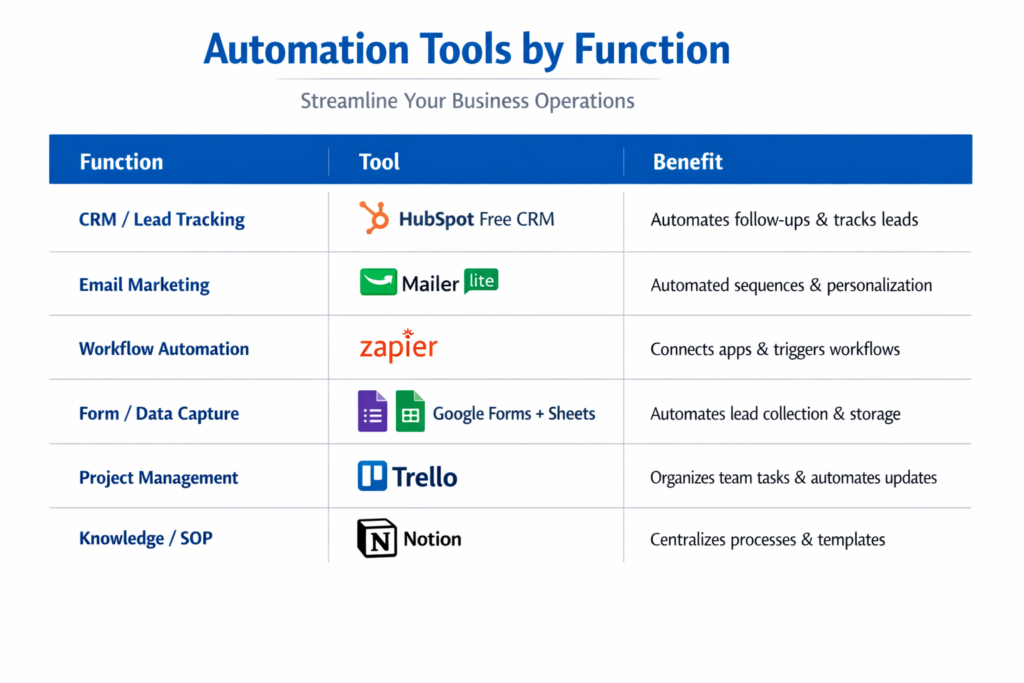
Automation Tools by Function

FunctionToolBenefit
CRM / Lead TrackingHubSpot Free CRMAutomates follow-ups & tracks leads
Email MarketingMailerLiteAutomated sequences & personalization
Workflow AutomationZapierConnects apps & triggers workflows
Form / Data CaptureGoogle Forms + SheetsAutomates lead collection & storage
Project ManagementTrelloOrganizes team tasks & automates updates
Knowledge / SOPNotionCentralizes processes & templates

Step-by-Step Example Workflow: Lead Follow-Up Automation:

Lead Follow-Up Automation is what we are going to talk about.

The main goal is to automate follow-ups for leads so we can get more people to engage with us and turn them into customers.

Best Automation Tools for Small Businesses (No Paid Ads Needed)

We will use a tool to do this:

  • Google Forms
  • Google Sheets
  • Zapier
  • MailerLite

Here is how we do it:

  • Step 1: We create a Google Form to get information from leads.
  • Step 2: When people fill out the form their answers automatically go into Google Sheets.
  • Step 3: Then Zapier tells MailerLite to send an email to the new lead.
  • Step 4: After that MailerLite sends another email to the lead 2 days to follow up.
  • Step 5: We separate the leads, into groups based on how they engage with us so we can plan our future email campaigns better.

Best Practices for Small Business Automation

  • When you are getting started with Small Business Automation start simple. Focus on one workflow at a time for Small Business Automation.
  • You should document all of your processes for Small Business Automation. You can use tools like Notion or Trello to track all of your workflows for Small Business Automation.
  • You need to test all of your workflows for Small Business Automation. Make sure all of the triggers fire correctly and that all of the data flows as you expect it to for Small Business Automation.
  • It is also an idea to monitor your metrics for Small Business Automation. You should track things like email opens and clicks and lead conversions and response times, for Small Business Automation.

Common Mistakes to Avoid:

MistakeEffectSolution
Automating too many processes at onceConfusion & errorsStart small and scale gradually
Ignoring performance trackingLeads not convertingSet KPIs and measure results
Impersonal communicationLower engagementUse personalized fields in emails
No backupsLost automation setupRegularly export data and workflows

Checklist: Are You Ready to Automate Your Small Business?

  • Find tasks you do over. Over
  • Pick free tools that work for you
  • Create a plan for automating tasks
  • Try it out. See if it works
  • Keep an eye, on numbers often
  • Make changes based on how things are going

Conclusion:

For small businesses, automation is no longer just a convenience it has become an essential part of sustainable growth. As your business expands, managing leads, customer communication, marketing campaigns, and daily operations manually can quickly become overwhelming. The right automation tools help simplify these tasks, allowing your team to focus on building relationships, improving products, and serving customers instead of repetitive administrative work.

Platforms such as HubSpot CRM, MailerLite, Trello, Zapier, Google Forms, and Notion make it easier to organize workflows, automate routine tasks, reduce human errors, and improve customer engagement without requiring a large marketing budget. Even simple automations, like sending follow-up emails, assigning tasks automatically, or collecting customer data, can save hours of work every week.

The key is to start with one or two processes, monitor their performance, and continuously optimize them as your business grows. Small improvements made over time can lead to significant gains in productivity, customer satisfaction, and revenue. By embracing business automation today, small businesses can operate more efficiently, make smarter decisions, and achieve long-term growth while keeping costs under control.

August 1, 2026 0 comment
0 FacebookTwitterPinterestEmail
Automation

What Is Workflow Automation? Best Practices to Improve Business Productivity

by ailcia sierra July 28, 2026
written by ailcia sierra

Every business depends on hundreds of daily tasks to keep operations running smoothly. Employees process invoices, approve leave requests, respond to customer inquiries, update customer records, send emails, manage purchase orders, generate reports, and coordinate projects. While these tasks are essential, many of them are repetitive and consume valuable time.

As organizations grow, manual workflows become increasingly difficult to manage. Teams often spend hours transferring information between systems, waiting for approvals, or correcting human errors. These inefficiencies slow productivity, increase operational costs, and affect the overall customer experience.

Today’s businesses need a faster and smarter way to manage routine work. This is where Workflow Automation plays a crucial role.

Workflow automation enables organizations to replace repetitive manual activities with automated processes. Instead of relying on employees to perform every step, software automatically moves tasks through predefined workflows, ensuring work is completed accurately and on time.

From small businesses to global enterprises, workflow automation has become a key part of digital transformation. It helps organizations improve efficiency, reduce errors, strengthen collaboration, and allow employees to focus on work that creates greater business value.

In this guide, you’ll learn what workflow automation is, how it works, why it matters, its major benefits, and the best practices businesses should follow to build efficient automated workflows.

What is Workflow Automation?

Workflow automation is a method of using software and predefined rules to automate repetitive business tasks without the need for relentless guided intervention .

A workflow represents a sequence of activities performed to complete a business enterprise process. Automation ensures that each task mechanically works at the next level and unique conditions are met in each case.

If employees are manually sending emails, updating spreadsheets, assigning responsibilities, or requesting approvals, workflow automation software plays those actions robotically .

What is Workflow Automation?

For example, when a customer submits an online order, the automated workflow immediately:

  • Confirm the payment
  • Update the repository
  • Make calculations
  • Provide inventory information
  • Send Order Confirmation Email
  • Share shipping updates with the buyer

All those tasks are robotized, which reduces delays and eliminates unnecessary manual work.

Workflow automation allows groups to complete strategy faster while maintaining consistency across departments.

Workflow Automation ComponentPurpose
TriggerStarts the workflow automatically
RulesDefine how the workflow operates
ActionsPerform tasks without manual effort
NotificationsInform employees or customers
ReportingTracks workflow performance

Together, these components create efficient and reliable business processes.

How Workflow Automation Works

Workflow automation follows predefined company policies that determine how images move from one stage to another.

Every workflow starts with a reason. The reason could be an employee request, user movement, scheduled occasion, finished size, or machine information.

Once the workflow is started, the automation program executes each step by step using specific business enterprise logic.

Why workflow automation is important for modern businesses

Business operations have become extra complex than ever before.

Organizations now manage remote employees, two software systems, digital customers, cloud applications, and distributed teams.

Without automation, coordinating these operations is time-consuming and prone to error.

Workflow automation provides an established process that effectively keeps commercial business operations running smoothly.

It ensures that each task follows the correct order and reduces wasteful delays.

For organizations presenting process digital transformation, workflow automation acts as a muse to enhance operational performance.

Eliminating Repetitive Manual Tasks

Many employees spend a significant portion of their day performing repetitive administrative tasks.

Examples include:

  • Copies of Buyer Data
  • Send approval emails
  • Spreadsheet Update
  • Create Invoices
  • Specifying Help Note
  • Monitoring Challenges for Progress

Although these tasks are important, they no longer require sustained manual labor.

Workflow automation eliminates repetitive work by allowing software programs to perform those tasks robotically.

Employees can then become aware of strategic activities that require creativity, problem-solving, and decision-making.

Improving Business Productivity

One of the biggest advantages of workflow automation is increased productivity.

When repetitive tasks are automated, work moves much faster through the organization.

Departments no longer wait for manual approvals or data entry before continuing their work.

Projects progress more efficiently because information is automatically shared between systems and teams.

Manual WorkflowAutomated Workflow
Slow approvalsInstant routing
Manual data entryAutomatic updates
Higher error ratesImproved accuracy
Time-consuming communicationReal-time notifications
Delayed task completionFaster execution

Businesses become more productive because employees spend less time on routine activities.

Reducing Human Errors

Manual processes often lead to mistakes.

Employees may accidentally enter incorrect information, forget approvals, send documents to the wrong person, or miss important deadlines.

Workflow automation follows predefined rules every time a process runs.

This consistency reduces human errors and improves the quality of business operations.

For industries such as healthcare, banking, manufacturing, and finance, reducing errors also helps organizations maintain regulatory compliance.

Increasing Operational Efficiency

Operational efficiency means completing work faster while using fewer resources.

Workflow automation improves efficiency by eliminating unnecessary steps and simplifying business processes.

For example, instead of requiring five separate employees to approve a purchase request manually, an automated workflow routes the request to the appropriate decision-makers instantly.

This reduces delays and improves response times.

Organizations can process more work without increasing staffing levels.

Improving Team Collaboration

Modern businesses rely on collaboration between multiple departments.

  • Sales teams work with finance.
  • Finance works with procurement.
  • Procurement works with operations.
  • Customer support works with technical teams.

Without automation, communication often depends on emails, phone calls, or spreadsheets.

Workflow automation automatically assigns tasks, sends notifications, updates records, and keeps everyone informed throughout the process.

Employees always know the current status of work.

This improves collaboration while reducing communication gaps.

Common Business Processes That Use Workflow Automation

Workflow automation can improve almost every department within an organization.

Some of the most common applications include:

DepartmentWorkflow Automation Example
Human ResourcesEmployee onboarding and leave approvals
FinanceInvoice processing and expense approvals
SalesLead assignment and CRM updates
Customer SupportTicket routing and response management
MarketingCampaign approvals and email automation
ProcurementPurchase request approvals
ITService request management and user access approvals

Each department benefits by reducing manual work and improving process consistency.

Common Business Processes That Use Workflow Automation

Workflow Automation vs Business Process Automation

Many people use workflow automation and business process automation interchangeably, but they are different concepts.

Workflow automation focuses on automating individual tasks within a process.

Business process automation covers the automation of entire business operations involving multiple interconnected workflows.

Workflow AutomationBusiness Process Automation
Automates individual workflowsAutomates complete business processes
Focuses on specific tasksFocuses on organization-wide operations
Easier to implementMore comprehensive transformation
Department-specificEnterprise-wide implementation

Workflow automation is often the first step toward broader business process automation initiatives.

Key Features of Workflow Automation Software

Modern workflow automation platforms provide a wide range of features that simplify business operations.

These solutions help organizations automate processes while maintaining visibility and control.

Common capabilities include:

  • Workflow design tools
  • Approval management
  • Task automation
  • Email notifications
  • System integrations
  • Analytics dashboards
  • Mobile access
  • Role-based permissions

These features allow businesses to create flexible workflows that adapt as organizational needs evolve.

Types of Workflow Automation

Workflow automation can be implemented in different ways depending on business requirements.

Some workflows focus on simple repetitive tasks, while others manage complex processes involving multiple departments and systems.

Understanding different types of workflow automation helps businesses choose the right approach.

Type of Workflow AutomationDescription
Task AutomationAutomates individual repetitive activities
Approval AutomationManages review and approval processes
Document AutomationHandles document creation and processing
Integration AutomationConnects different business applications
Process AutomationAutomates complete business processes

Each type helps organizations improve efficiency in different areas.

Task Automation

Task automation focuses on automating small, repetitive activities that employees perform regularly.

Examples include:

  • Sending automated emails
  • Creating reminders
  • Updating records
  • Assigning tasks
  • Generating reports

Although these tasks may seem simple, completing them manually every day consumes significant employee time.

Automating these activities allows employees to focus on higher-value responsibilities.

Approval Workflow Automation

Approval processes are common in every organization.

Businesses require approvals for expenses, purchases, contracts, employee requests, and many other activities.

Traditional approval processes often depend on emails and manual follow-ups, which can create delays.

Approval workflow automation automatically routes requests to the correct person based on predefined rules.

Traditional Approval ProcessAutomated Approval Process
Email-based communicationAutomated routing
Manual follow-upsAutomatic reminders
Difficult trackingReal-time visibility
Longer processing timeFaster approvals

Document Workflow Automation

Businesses handle thousands of documents every day, including invoices, contracts, reports, and customer forms.

Managing these documents manually can lead to delays and errors.

Document workflow automation helps organizations create, process, approve, and store documents automatically.

For example, invoice automation can:

  • Extract invoice information
  • Verify payment details
  • Send approval requests
  • Update accounting systems
  • Store records

This reduces administrative workload and improves accuracy.

Integration Workflow Automation

Modern businesses use multiple software platforms for different operations.

A company may use:

  • CRM software
  • Accounting platforms
  • Customer support systems
  • Marketing tools
  • HR applications

Without automation, employees often manually transfer information between these systems.

Integration workflow automation connects different applications and allows data to move automatically.

Workflow Automation Software Explained

Workflow automation software provides tools that help businesses design, manage, and automate their processes.

These platforms allow users to create workflows without requiring advanced programming knowledge.

Modern workflow automation software usually includes visual workflow builders where businesses can create automated processes using simple drag-and-drop features.

FeatureBusiness Benefit
Workflow BuilderCreates automated processes easily
Integration SupportConnects business applications
AnalyticsMeasures workflow performance
NotificationsImproves communication
Access ControlMaintains security

How Businesses Select the Right Workflow Automation Software

Choosing the right workflow automation platform depends on business goals, technical requirements, and operational complexity.

Organizations should evaluate several factors before selecting a solution.

Integration Capabilities

A good workflow automation platform should connect easily with existing business applications.

Businesses should check whether the platform supports integration with:

  • CRM systems
  • ERP platforms
  • Cloud applications
  • Communication tools
  • Databases

Strong integrations allow businesses to automate processes across different departments.

Scalability

Businesses grow over time, and their workflow requirements also change.

A suitable workflow automation solution should support increasing users, processes, and data volumes.

Enterprise organizations especially need platforms that can handle complex workflows across multiple departments.

Security and Compliance

Workflow automation platforms often handle sensitive business information.

Organizations should consider security features such as:

  • Data encryption
  • User permissions
  • Access controls
  • Compliance support
  • Activity monitoring

Security is especially important for industries such as finance, healthcare, and government.

Best Practices for Workflow Automation

Implementing workflow automation successfully requires proper planning.

Businesses should avoid automating inefficient processes. Instead, they should first understand existing workflows and identify opportunities for improvement.

Analyze Existing Processes Before Automation

Before creating automated workflows, organizations should understand how current processes work.

Teams should identify:

  • Repetitive activities
  • Process delays
  • Unnecessary steps
  • Common errors
  • Approval bottlenecks

This helps businesses automate processes that create real value.

Start With High-Impact Workflows

Businesses should begin automation with processes that provide the greatest benefits.

Good starting points include:

  • Employee onboarding
  • Customer support requests
  • Invoice approvals
  • Sales follow-ups
  • Internal communication

Starting with important workflows helps organizations quickly see the value of automation.

Keep Workflows Simple and Flexible

Complex workflows can become difficult to manage.

Businesses should design workflows that are easy to understand and modify.

Simple workflows provide:

  • Faster implementation
  • Easier maintenance
  • Better employee adoption

As requirements change, businesses can gradually expand automation capabilities.

Monitor and Improve Automated Workflows

Workflow automation should not be considered a one-time implementation.

Businesses should continuously analyze workflow performance and identify areas for improvement.

Important measurements include:

MetricPurpose
Completion TimeMeasures process speed
Error RateTracks accuracy
Employee UsageMeasures adoption
Cost SavingsEvaluates business impact

Regular optimization ensures workflows continue delivering value.

Benefits of Workflow Automation for Businesses

Workflow automation provides advantages across different areas of business operations.

1. Increased Productivity

The biggest benefit of workflow automation is improved employee productivity.

When repetitive tasks are automated, employees spend less time managing administrative activities and more time focusing on strategic work.

For example, sales representatives can spend more time communicating with customers instead of manually updating CRM records.

2. Faster Business Processes

Manual workflows often create delays because tasks depend on human availability.

Automation allows processes to continue automatically without waiting for manual actions.

This improves:

  • Approval speed
  • Customer response time
  • Internal communication
  • Decision-making

Faster processes help businesses remain competitive.

3. Better Accuracy and Consistency

Human mistakes are common in repetitive tasks.

Workflow automation ensures that processes follow predefined rules every time.

This improves:

  • Data accuracy
  • Compliance
  • Reporting quality
  • Process consistency

4. Improved Customer Experience

Customers expect fast responses and smooth digital experiences.

Workflow automation helps businesses respond faster by automating customer-related processes.

Examples include:

  • Automated support ticket routing
  • Instant customer notifications
  • Faster order processing
  • Personalized communication

Better workflows directly improve customer satisfaction.

5. Reduced Operational Costs

By reducing manual effort and improving efficiency, workflow automation helps organizations lower operational costs.

Businesses can process more work using existing resources without increasing unnecessary expenses.

Cost savings come from:

  • Reduced manual labor
  • Fewer errors
  • Faster processing
  • Better resource utilization

Workflow Automation Use Cases Across Industries

Workflow automation is used across almost every industry because businesses in all sectors rely on repetitive processes.

IndustryWorkflow Automation Example
BankingLoan approval and customer verification
HealthcarePatient registration and appointment management
EcommerceOrder processing and inventory updates
ManufacturingProduction tracking and quality checks
EducationStudent enrollment processes
ITService request management

Workflow Automation in Ecommerce

Ecommerce businesses manage thousands of daily activities, making automation extremely valuable.

Common ecommerce workflows include:

  • Order confirmation
  • Inventory updates
  • Customer notifications
  • Return processing
  • Marketing campaigns

Automation helps ecommerce companies improve customer experience while reducing operational workload.

Workflow Automation in IT Operations

IT departments handle many repetitive requests, such as password resets, software access requests, and technical support tickets.

Workflow automation helps IT teams:

  • Automatically assign tickets
  • Approve access requests
  • Monitor system tasks
  • Improve response times

This improves IT efficiency and employee satisfaction.

Common Challenges of Workflow Automation

Although workflow automation provides significant benefits, businesses may face several challenges during implementation.

Understanding these challenges helps organizations create better automation strategies and avoid common mistakes.

ChallengeImpact on Business
Poor Process PlanningAutomation may not deliver expected results
Lack of Employee AdoptionReduces effectiveness of workflows
Integration DifficultiesCreates disconnected systems
Security ConcernsCan expose sensitive information
Complex WorkflowsMakes management difficult

1. Automating Inefficient Processes

One of the biggest mistakes businesses make is automating processes that are already inefficient. Automation does not automatically fix a poor workflow.

If a process contains unnecessary steps, unclear approvals, or outdated methods, automation may simply make an inefficient process faster.

Before implementing workflow automation, businesses should analyze existing processes and identify opportunities for improvement.

A successful approach is:

  1. Understand the current workflow.
  2. Remove unnecessary steps.
  3. Define clear responsibilities.
  4. Automate repetitive activities.
  5. Continuously improve the process.

This ensures automation creates real business value.

2. Employee Resistance to Automation

Many employees worry that automation will replace their jobs or create unnecessary complexity.

However, the main purpose of workflow automation is to support employees by removing repetitive work and allowing them to focus on more valuable activities.

Organizations should focus on employee training and communication during automation projects.

When employees understand how automation improves their daily work, adoption becomes much easier.

3. Integration Challenges

Modern businesses use multiple applications to manage their operations.

A company may use separate platforms for:

  • Customer relationship management
  • Accounting
  • Human resources
  • Marketing
  • Project management
  • Customer support

Connecting these systems can be challenging.

Without proper integration, businesses may continue experiencing manual data transfers and disconnected processes.

Successful workflow automation requires platforms that can communicate with existing business systems.

4. Data Security and Privacy Concerns

Workflow automation often involves handling sensitive business information.

Examples include:

  • Customer data
  • Financial records
  • Employee information
  • Business documents

Organizations must ensure automated workflows follow proper security practices.

Important security considerations include:

Security PracticePurpose
Access ManagementControls who can view information
Data EncryptionProtects sensitive data
Activity MonitoringTracks workflow activities
Compliance ControlsSupports regulations

Strong security ensures automated workflows remain reliable and protected.

5. Enterprise Workflow Automation Strategy

Large organizations require a structured approach to implement workflow automation successfully.

Enterprise workflow automation involves connecting different departments, applications, and processes into a unified system.

A strong strategy focuses on business goals rather than simply automating tasks.

6. Identify Automation Opportunities

The first step is identifying processes that can benefit from automation.

Businesses should evaluate workflows based on:

  • Repetition frequency
  • Time consumption
  • Error possibilities
  • Business impact
  • Employee workload

Processes with repetitive actions and clear rules are usually the best candidates for automation.

Create a Workflow Automation Roadmap

A clear roadmap helps organizations implement automation gradually.

Instead of automating everything at once, businesses should prioritize important processes.

A workflow automation roadmap may include:

PhaseObjective
Phase 1Identify automation opportunities
Phase 2Select suitable automation tools
Phase 3Implement initial workflows
Phase 4Measure performance
Phase 5Expand automation across departments

This approach reduces risk and improves long-term success.

Integrate Automation With Existing Systems

Enterprise organizations rarely replace all their existing software.

Instead, workflow automation should connect existing systems and improve how they work together.

Measure Automation Performance

Businesses should track whether automation is achieving expected results.

Important performance measurements include:

Performance MetricPurpose
Processing TimeMeasures workflow speed
Cost ReductionEvaluates financial benefits
Error ReductionTracks accuracy improvements
Employee ProductivityMeasures efficiency gains
Customer SatisfactionEvaluates service improvements

Regular measurement helps organizations improve their automation strategy.

Future Trends in Workflow Automation

Workflow automation continues to evolve as businesses adopt new technologies and digital strategies.

Future automation systems will become more intelligent, flexible, and connected.

1. Intelligent Workflow Automation

The next generation of workflow automation will combine automation with advanced technologies such as analytics, machine learning, and intelligent decision-making.

Traditional automation follows predefined rules.

Intelligent automation can analyze information, recognize patterns, and make recommendations.

2. Hyperautomation and End-to-End Automation

Hyperautomation is becoming an important trend in enterprise technology.

It focuses on automating complete business processes instead of individual tasks.

Hyperautomation combines multiple technologies, including:

  • Workflow automation
  • Robotic process automation
  • Business process management
  • Analytics tools
  • Integration platforms

This allows businesses to automate complex operations across different departments.

3. Low-Code Workflow Automation Growth

Low-code automation platforms are becoming increasingly popular because they allow business users to create workflows without advanced programming knowledge.

These platforms provide visual tools that make automation accessible to non-technical teams.

Benefits of low-code workflow automation include:

  • Faster workflow creation
  • Reduced development requirements
  • Better collaboration between IT and business teams
  • Easier process updates

4. Automation Integration With Business Intelligence

Businesses are increasingly combining workflow automation with analytics.

Automated workflows can collect operational data and provide insights into business performance..

5. Workflow Automation and Digital Transformation

Digital transformation is not only about adopting new technologies. It is about improving how businesses operate.

Workflow automation plays a major role in digital transformation because it connects people, processes, and technology.

Organizations use automation to:

  • Improve operational efficiency
  • Deliver better customer experiences
  • Reduce manual processes
  • Increase business agility
  • Support innovation

Companies that successfully implement workflow automation can respond faster to market changes and customer demands.

How Workflow Automation Supports Business Growth

Growth requires businesses to handle increasing workloads without creating unnecessary complexity.

Workflow automation allows organizations to scale operations efficiently.

For example, as an ecommerce company receives more orders, automated workflows can manage:

  • Order processing
  • Inventory updates
  • Customer notifications
  • Shipping communication

The company can handle higher demand without increasing manual effort.

Workflow Automation in the Future Workplace

The future workplace will involve closer collaboration between employees and automated systems.

Automation will handle repetitive operational activities, while employees focus on creativity, strategy, and relationship-building.

This shift will help businesses create more productive and flexible work environments.

Conclusion

Workflow automation has become an essential technology for businesses looking to improve productivity, reduce operational costs, and create efficient processes.

By replacing repetitive manual tasks with automated workflows, organizations can save time, reduce errors, and improve collaboration across departments. From approval management and document processing to customer service and enterprise operations, workflow automation helps businesses create faster and more reliable processes.

However, successful automation requires more than selecting a tool. Businesses must analyze existing workflows, choose the right automation strategy, ensure security, and continuously improve their processes. As organizations continue their digital transformation journey, workflow automation will become even more important. The combination of automation, intelligent technologies, and connected business systems will help companies build more efficient, scalable, and competitive operations.

For modern businesses, workflow automation is not just a productivity tool. It is a strategic approach to improving the way work gets done.

FAQs

1. What is Workflow Automation?

Workflow Automation is the process of using software to automatically manage repetitive business tasks and processes without requiring continuous manual effort.

It allows businesses to create predefined workflows where tasks, approvals, notifications, and data transfers happen automatically based on specific rules.

For example, when a customer submits a request, an automated workflow can assign the task to the correct team, send notifications, update records, and track progress automatically.

2. Why is Workflow Automation important for businesses?

Workflow Automation helps businesses improve productivity by reducing manual tasks, minimizing errors, and speeding up business processes.

It enables organizations to:

  • Save employee time
  • Improve operational efficiency
  • Reduce repetitive work
  • Increase accuracy
  • Provide faster customer service
  • Improve collaboration between teams

For modern enterprises, workflow automation is becoming an important part of digital transformation strategies.

3. How does Workflow Automation work?

Workflow Automation works by using triggers, rules, and automated actions.

A workflow usually starts when a specific event occurs, such as a customer submitting a form, an employee requesting approval, or a scheduled task being created.

The automation system then follows predefined rules to complete the required actions.

Workflow ElementPurpose
TriggerStarts the workflow
RulesDefines workflow conditions
ActionsCompletes tasks automatically
NotificationsUpdates users about progress
ReportsTracks workflow performance

4. What are the benefits of Workflow Automation?

Workflow Automation provides several benefits for businesses, including:

  • Increased productivity
  • Faster business processes
  • Reduced operational costs
  • Improved accuracy
  • Better employee collaboration
  • Enhanced customer experience
  • Improved process visibility

By automating repetitive tasks, employees can focus on strategic activities that contribute more value to the organization.

5. What is the difference between Workflow Automation and Business Process Automation?

Workflow Automation focuses on automating specific tasks or workflows within a business process.

Business Process Automation is broader and focuses on automating complete business operations involving multiple workflows and departments.

Workflow AutomationBusiness Process Automation
Automates individual workflowsAutomates complete processes
Usually department-focusedOften enterprise-wide
Easier implementationMore complex implementation
Focuses on task efficiencyFocuses on business transformation

Workflow automation is often the starting point for larger business process automation initiatives.

July 28, 2026 0 comment
0 FacebookTwitterPinterestEmail
B2B marketing

B2B Sales Automation Best Practices to Build a Smarter Sales Process

by ailcia sierra July 17, 2026
written by ailcia sierra

The B2B sales environment is getting tougher every day. Businesses are not just competing on price. What their products can do. They are competing on how they can move how well they can personalize things for their customers the experience they give their customers and how well they can set up their sales processes to work smoothly.

As companies get leads from different places it is getting harder to keep track of everything by hand. Sales teams need to keep an eye on what’s happening with their customers get back to potential customers quickly make sure their information is correct and send messages that are personalized while dealing with more and more sales.

This is making things more complicated. That is why sales automation is becoming a big part of what businesses do to get more done and make sure they have a steady stream of revenue.

However just buying a sales automation platform does not mean a business will be successful. A lot of businesses buy automation tools. They do not get the results they want because they do not have a good plan for how to use them.
To automate sales successfully a business needs more than technology. They need to know what they want to achieve with their sales have a process in place have good information, about their customers train their teams and always be looking for ways to improve.

This is where B2B Sales Automation Best Practices come in.

B2B Sales Automation Best Practices help businesses use automation in a way not just as another piece of software. When automation is done right it can help businesses manage their leads better speed up their sales get customers more engaged and help sales teams focus on the things that will make the money for the business.

Understanding B2B Sales Automation Best Practices

B2B Sales Automation Best Practices are ways to do things that help companies get the most out of automation technology and still have good relationships with their customers. Automation is not meant to replace the things that sales people do. It is meant to make the work of sales teams better.

When a company has an automation process it helps them figure out some important things.

Understanding B2B Sales Automation Best Practices

A well-designed automation process helps businesses answer important questions:

  • Which leads should sales teams prioritize?
  • How can customer communication become more personalized?
  • Where are prospects dropping from the sales funnel?
  • Which sales activities consume the most time?
  • How can sales teams improve conversion rates?

By answering these questions, businesses can design automation workflows that support their specific goals.

Without Proper Automation StrategyWith B2B Sales Automation Best Practices
Random tool implementationGoal-based automation strategy
Manual repetitive tasksAutomated workflows
Poor customer trackingOrganized customer data
Slow follow-upsTimely communication
Limited sales visibilityReal-time insights
Inconsistent processesStandardized workflows

The purpose of automation is not simply to complete tasks faster. The real goal is to create a smarter sales ecosystem where every activity contributes to business growth.

Why Businesses Need a Strategic Approach to Sales Automation

Many businesses make the mistake of focusing only on selecting a sales automation tool. While choosing the right platform is important, the strategy behind using that platform determines success. A company can have the most advanced automation software available, but if sales processes are unclear, customer data is inaccurate, or teams are not trained, results will remain limited.

A strategic automation approach begins with understanding existing sales challenges. For example, a company experiencing low conversion rates may not need more leads. It may need better lead qualification and follow-up processes.

Another company may generate enough opportunities but lose customers because sales representatives respond too slowly. Automation helps solve these challenges, but only when businesses identify the right areas for improvement.

Business ChallengeAutomation Solution
Slow lead responseAutomated notifications and follow-ups
Poor lead qualityAI-powered lead scoring
Missed opportunitiesAutomated reminders
Manual reportingSales dashboards
Weak personalizationCustomer-based workflows

A strategic approach ensures that automation supports business objectives instead of creating unnecessary complexity.

Best Practice 1: Define Clear Sales Automation Goals

The thing you need to do is figure out what you want to achieve with sales automation.

Sales automation is a deal and you need to know what you want from it. Businesses should know why they want to use sales automation before they pick the tools they will use or set up their workflows. If you do not have goals it can be really hard to keep your sales automation efforts on track and measure how well they are working.

Common goals include improving:

  • Lead conversion rates
  • Sales productivity
  • Customer engagement
  • Sales cycle speed
  • Revenue forecasting
  • Team efficiency

For example, a company may set a goal to reduce lead response time from several hours to a few minutes through automated notifications.

Best Practice 2: Analyze Your Existing Sales Process Before Automating

One of the most important B2B Sales Automation Best Practices is understanding the current sales workflow before introducing automation.

Automation works best when businesses first identify which activities need improvement. Many organizations try to automate inefficient processes without fixing the underlying problems. This creates a situation where businesses simply complete ineffective tasks faster.

Before automation, companies should analyze:

  • How leads enter the sales funnel
  • How prospects are qualified
  • How sales representatives follow up
  • Where customers experience delays
  • Which activities consume the most time

For example, if sales representatives spend several hours manually updating CRM records, automation can solve this challenge.

However, if the sales process itself is unclear, automation will not solve the problem.

Sales Process StageQuestions to Analyze
Lead GenerationWhere do leads come from?
Lead QualificationHow are valuable prospects identified?
CommunicationHow are customers contacted?
Follow-UpHow are reminders managed?
ClosingWhat delays conversions?

Understanding the existing process helps businesses create automation workflows that actually improve performance.

Best Practice 3: Maintain High-Quality Customer Data

Customer data is really important for sales automation to work well. Sales automation depends on customer information to make communication personal find new opportunities and get accurate ideas about what is going on. Customer data is the foundation of every sales automation strategy. If the customer data is not good it can hurt the results of the sales automation.

For example, outdated customer information can lead to:

  • Incorrect targeting
  • Poor personalization
  • Duplicate records
  • Wrong sales decisions

Businesses should regularly maintain their customer databases by updating information and removing unnecessary records.

Important data management activities include:

Data Management ActivityBusiness Benefit
Updating customer detailsBetter communication
Removing duplicatesCleaner CRM
Maintaining accurate recordsImproved insights
Organizing customer segmentsBetter targeting
Monitoring data qualityReliable automation

High-quality data allows automation systems to perform more effectively and create better customer experiences.

Best Practice 4: Personalize Automated Sales Communication

One of the challenges businesses face with automation is keeping a personal touch. When companies use automation they can send messages fast but customers do not like getting messages that seem like they are not meant for them.

People who buy things from businesses these days expect businesses to know what problems they are trying to solve what their company needs and what they want to achieve before they decide to buy something.

Automation platforms can help businesses create different customer journeys based on:

  • Industry
  • Company size
  • Customer interests
  • Previous interactions
  • Buying stage
  • Website behavior

This allows businesses to deliver the right message to the right audience at the right time.

Personalization MethodHow Automation Helps
Customer segmentationGroups prospects based on characteristics
Behavioral trackingUnderstands customer interests
Email personalizationCreates targeted messages
Content recommendationsProvides relevant resources
Follow-up timingContacts customers at suitable moments

Personalization improves engagement because customers receive communication that matches their specific requirements.

Best Practice 4: Personalize Automated Sales Communication

Creating Effective Automated Email Sequences

Email automation remains one of the most widely used sales automation strategies. However, successful email automation requires careful planning.

Many businesses make the mistake of creating aggressive promotional email campaigns that focus only on selling. Modern B2B customers prefer valuable information, industry insights, and solutions to their problems. A strong automated email sequence should guide prospects through the buying journey.

A typical B2B sales email workflow may include:

Sales Journey StageEmail Purpose
First interactionIntroduce brand and value
Awareness stageShare educational content
Consideration stageProvide solutions and case studies
Decision stageEncourage sales conversation
Post-purchase stageBuild customer relationship

The goal of email automation is not to send more emails. The goal is to create meaningful communication that helps customers make better decisions.

Best Practice 5: Use AI to Improve Sales Automation

AI is really important, for sales automation these days.

Traditional automation systems just did what they were told. AI powered platforms can look at information find patterns and give smart suggestions.

Using AI is one of the things you can do for B2B Sales Automation because it helps businesses go from just automating simple tasks to really managing sales in a smart way.

AI can improve different areas of sales operations, including:

  • Lead qualification
  • Customer prediction
  • Sales forecasting
  • Personalized recommendations
  • Communication optimization

For example, AI can analyze thousands of customer interactions and identify which prospects have higher buying potential.

This allows sales teams to focus their efforts on valuable opportunities.

AI CapabilitySales Benefit
Predictive lead scoringIdentifies high-value prospects
AI recommendationsSuggests next actions
Customer analysisUnderstands buying behavior
ForecastingImproves revenue planning
Automated insightsSupports better decisions

AI does not replace sales professionals. Instead, it gives them better information and helps them work more effectively.

AI-Powered Lead Scoring for Better Sales Decisions

Lead scoring is very important for B2B sales because every person who might buy something from you is not the same.Some people are more likely to buy than others. Without figuring out who is a prospect sales teams can spend a lot of time on people who will probably not buy anything.

Traditional lead scoring usually depends on basic information such as:

  • Job role
  • Company size
  • Industry
  • Website activity

AI-powered lead scoring goes further by analyzing multiple data points.

AI can evaluate:

  • Customer engagement patterns
  • Content interactions
  • Email responses
  • Product interest
  • Previous communication

This creates more accurate predictions about customer intent.

Traditional Lead ScoringAI-Based Lead Scoring
Uses fixed rulesLearns from customer behavior
Limited data analysisUses multiple data sources
Manual updatesContinuous improvement
Basic qualificationPredictive insights

Better lead scoring allows sales teams to prioritize the right opportunities and improve conversion rates.

Best Practice 6: Align Sales and Marketing Teams

Sales and marketing teams working together is really important for automation to be successful. In a lot of companies the sales team and the marketing team do their thing. The marketing team tries to get people interested in what the company’s selling and the sales team tries to turn those people into customers.

When these teams do not share information, businesses often experience problems such as:

  • Poor lead quality
  • Delayed follow-ups
  • Inconsistent messaging
  • Lower conversion rates

B2B Sales Automation helps create better collaboration by connecting sales and marketing data.

Marketing teams can understand which campaigns generate valuable opportunities, while sales teams can access customer engagement information.

Sales and Marketing Alignment AreaAutomation Impact
Lead sharingFaster sales response
Customer dataBetter understanding
Campaign trackingImproved marketing decisions
CommunicationConsistent messaging
Performance analysisBetter revenue planning

A connected sales and marketing process creates a smoother customer journey.

Best Practice 7: Train Sales Teams Before Implementing Automation

Technology alone cannot guarantee sales success. One of the most overlooked B2B Sales Automation Best Practices is proper employee training. Sales representatives need to understand how automation tools work and how these platforms can improve their daily activities.

Without training, teams may avoid using automation tools or fail to use important features.

Training should cover:

  • CRM usage
  • Workflow management
  • Lead tracking
  • Data management
  • Reporting features
  • Customer communication

A successful training program helps employees understand that automation is not replacing their role. Instead, it removes repetitive work and allows them to focus on more valuable activities.

Training AreaExpected Improvement
Platform knowledgeBetter tool adoption
Workflow understandingMore efficient processes
Data managementHigher accuracy
Reporting skillsBetter decision-making
Automation usageIncreased productivity

Employee adoption plays a major role in achieving automation success.

Best Practice 8: Create Optimized Sales Workflows

A sales workflow is really important for sales automation to work well.

Sales workflows are like a map that shows how people who are interested in what you’re selling move through the different stages of buying something from you. A good sales workflow makes sure that every person who is interested in what you’re selling gets the right kind of attention based on what they are looking at and what they are doing.

For example:

A visitor downloads a business guide → automation captures their information → lead score increases → salesperson receives notification → personalized follow-up begins.

This process ensures faster response and better customer engagement.

A typical automated sales workflow includes:

Workflow StageAutomation Activity
Lead captureCollect customer information
QualificationEvaluate lead quality
NurturingSend relevant communication
Sales engagementNotify representatives
ConversionTrack opportunity progress

Businesses should regularly review and improve workflows based on performance data.

Best Practice 9: Track Performance and Continuously Improve

Sales automation is not a one-time implementation. Businesses need continuous monitoring and optimization.

Regular performance analysis helps companies understand what is working and what requires improvement.

Important metrics include:

Performance MetricImportance
Lead conversion rateMeasures sales effectiveness
Response timeShows customer engagement speed
Sales cycle lengthTracks process efficiency
Customer acquisition costEvaluates investment
Revenue growthMeasures business impact
Customer retentionShows relationship quality

For example, if automated emails have low engagement rates, businesses can test different messaging, timing, or customer segments.

Continuous improvement ensures that automation strategies remain effective as customer expectations change.

Best Practice 10: Maintain a Balance Between Automation and Human Interaction

Automation is great for getting things done quickly. People are still important in business to business sales .B2B sales are often complicated and involve a lot of people so it is good to have interaction. Customers like to talk to people who know what they are going through.

Automation should handle repetitive activities such as:

  • Scheduling meetings
  • Sending reminders
  • Organizing information
  • Updating records

Sales professionals should focus on:

  • Understanding customer needs
  • Providing consultation
  • Building trust
  • Negotiating solutions

The most successful businesses combine automation efficiency with human expertise.

How to Measure the Success of Your B2B Sales Automation Strategy

Implementing automation is only the beginning of the journey. To understand whether your investment is delivering value, businesses need to measure performance consistently. One of the most effective B2B Sales Automation Best Practices is tracking key performance indicators (KPIs) that reflect the efficiency of the sales process and its contribution to business growth.

Without measurement, organizations cannot determine whether automation is improving lead quality, reducing response times, or increasing revenue. Continuous analysis helps sales leaders identify strengths, address weaknesses, and refine workflows as customer expectations evolve.

The following metrics are commonly used to evaluate the effectiveness of sales automation.

KPIWhy It Matters
Lead Conversion RateMeasures how many leads become customers
Sales Cycle LengthIndicates how quickly deals move through the pipeline
Response TimeTracks how quickly prospects receive replies
Customer Acquisition Cost (CAC)Shows the cost of acquiring new customers
Revenue GrowthMeasures the business impact of automation
Customer Retention RateIndicates long-term relationship success
Sales ProductivityEvaluates how efficiently sales teams use their time

Tracking these KPIs regularly allows businesses to optimize their sales processes instead of relying on guesswork.

Calculating the Return on Investment (ROI) of Sales Automation

Every technology investment should generate measurable business value. Calculating the return on investment (ROI) helps organizations understand whether their sales automation strategy is producing financial benefits.

ROI is not limited to increased revenue. It also includes time savings, higher productivity, reduced operational costs, and improved customer retention.

Calculating the Return on Investment (ROI) of Sales Automation

For example, if automation reduces administrative work by several hours each week for every sales representative, those saved hours can be redirected toward customer conversations and closing deals. This creates value that extends beyond immediate revenue.

When evaluating ROI, businesses should consider both direct and indirect benefits.

Investment AreaBusiness Outcome
Workflow automationReduced manual effort
AI lead scoringHigher-quality opportunities
Automated follow-upsFaster customer engagement
Sales analyticsBetter decision-making
CRM integrationImproved collaboration
Employee productivityMore time for selling

A well-planned automation strategy often delivers long-term value by improving efficiency across the entire sales organization.

Common Mistakes Businesses Should Avoid

Avoiding common implementation mistakes helps businesses maximize the benefits of sales automation and improve long-term performance.

1. Automating Inefficient Processes: Optimize your sales workflow before automating it to eliminate unnecessary steps and improve overall efficiency.

2. Focusing Only on Technology: Combine automation tools with clear sales goals, skilled teams, and strong processes to achieve better business results.

3. Ignoring Customer Experience: Use automation to enhance customer interactions while keeping important conversations personal and relationship-focused.

4. Using Too Many Automation Tools: Build an integrated technology stack to reduce complexity, improve data consistency, and streamline sales operations.

5. Neglecting Employee Training: Provide regular training so sales teams can confidently use automation tools and maximize their effectiveness.

Future Trends in B2B Sales Automation

The way we do B2B sales automation is changing. This is because intelligence and machine learning are getting better. Businesses need to know about technologies to work smarter and make customers happy. There are some trends that will shape the future of B2B Sales Automation Best Practices.

1. AI Sales Agents

AI sales agents are becoming increasingly capable of performing complex tasks beyond simple workflow automation.

These intelligent systems can:

  • Identify qualified prospects
  • Analyze buying intent
  • Recommend personalized messaging
  • Schedule meetings
  • Update CRM records
  • Provide sales recommendations

Rather than replacing sales representatives, AI sales agents will act as intelligent assistants that improve productivity and decision-making.

2. Predictive Revenue Intelligence

Modern sales platforms are moving toward predictive revenue intelligence. Instead of simply reporting historical performance, future systems will analyze customer behavior and forecast future sales opportunities.

Predictive analytics will help businesses:

  • Identify high-value accounts
  • Forecast revenue more accurately
  • Detect pipeline risks
  • Improve resource planning
  • Optimize sales strategies

This allows organizations to make proactive decisions rather than reacting after problems occur.

3. Hyper-Personalized Customer Experiences

Personalization will continue to become more sophisticated. Future automation platforms will look at what customers like how they browse, how they engage and what they buy. They will use this information to give customers experiences that’re just for them.

Examples include:

  • Customized email content
  • Personalized product recommendations
  • Dynamic sales messaging
  • Individual follow-up schedules

This level of personalization will improve engagement and strengthen customer relationships.

4. Autonomous Sales Workflows

The next generation of sales automation will focus on autonomous workflows. Instead of automating individual tasks, intelligent platforms will manage complete sales processes with minimal manual intervention.

A future workflow may look like this:

  • A prospect visits a website → AI evaluates buying intent → the system qualifies the lead → personalized communication begins automatically → a meeting is scheduled → CRM records are updated → sales managers receive real-time insights.

These autonomous workflows will help businesses improve efficiency while allowing sales professionals to focus on strategic conversations.

Building a Future-Ready Sales Organization

Technology will continue to evolve, but successful sales organizations will always combine innovation with strong customer relationships.

Businesses should view automation as an ongoing journey rather than a one-time project.

Future-ready organizations focus on:

Strategic FocusLong-Term Benefit
Continuous optimizationBetter sales performance
AI adoptionSmarter decision-making
Data qualityMore accurate insights
Employee developmentHigher productivity
Customer-centric strategiesStronger relationships
Scalable technologySustainable business growth

Companies that invest in continuous improvement will remain competitive in a rapidly changing B2B marketplace.

Conclusion

Implementing B2B Sales Automation Best Practices is about more than adopting new technology. It requires a strategic approach that combines optimized workflows, accurate data, artificial intelligence, employee training, and continuous performance measurement.

Businesses that clearly define their goals, personalize customer communication, integrate automation with existing systems, and regularly optimize their processes can achieve significant improvements in productivity, lead conversion, and revenue growth.

Automation should empower sales professionals rather than replace them. By allowing technology to handle repetitive administrative tasks, sales teams gain more time to build meaningful relationships, solve customer challenges, and close high-value deals.

As AI, predictive analytics, and autonomous workflows continue to evolve, organizations that embrace these best practices will be well positioned to build scalable, efficient, and customer-focused sales operations that support long-term success.

July 17, 2026 0 comment
0 FacebookTwitterPinterestEmail
B2B marketing

10 Powerful Benefits of B2B Sales Automation That Improve Lead Conversion and Sales Performance

by ailcia sierra July 16, 2026
written by ailcia sierra

The B2B sales environment is really tough these days. It is more competitive and complicated than it has ever been. Businesses are not just competing with each other based on how good their products or servicesre. They are also competing to see who can attract people who might buy something keep customers happy and turn possibilities into money.

The old way of doing sales involves a lot of work that people have to do by hand. Sales people spend a lot of time looking for people who might buy something updating information about customers sending follow-up emails, managing lists and keeping track of conversations. These things are important. They take away from the most important part of a sales persons job: building relationships with people and making sales.

Because things are changing much in business there is a bigger need for B2B Sales Automation. This is a way of using technology to make sales easier get more work done and make the process of making money more efficient.

B2B Sales Automation uses software, artificial intelligence, information about customers and automatic processes to cut down on tasks that are repeated over and over. Of doing every step of the sales process by hand businesses can make smart processes that help sales teams from finding people who might buy something to turning them into customers.

Understanding B2B Sales Automation

To grasp the advantages lets first look at why sales automation has become an area for businesses today.

The B2B buying process is complex. Buyers look up solutions on the internet compare providers read reviews and want tailored communication before buying. This means companies need a sales process that’s quicker, more targeted and more focused, on the customer.

Understanding B2B Sales Automation

Manual sales processes often cause problems because they rely on efforts and can get hard to handle as leads increase. B2B sales automation can help with these issues.

For example, a company generating hundreds of monthly leads may struggle with:

Sales ChallengeImpact on Business
Slow lead responseProspects may choose competitors
Manual follow-upsMissed conversion opportunities
Poor customer trackingLimited understanding of buyer behavior
Inconsistent communicationWeak customer relationships
Manual reportingDelayed business decisions
Disorganized sales dataLower sales efficiency

Benefit 1: Improved Sales Team Productivity

One of the things about B2B Sales Automation is that it helps sales teams get more work done.

Sales people usually spend a lot of time doing paperwork and other tasks that are not actually selling. They have to update records set up meetings send emails and make reports. These tasks take up a lot of time that they could be using to sell things.

B2B Sales Automation helps with this by doing these tasks

For example, when a new prospect enters the sales funnel, automation can:

  • Capture customer information
  • Add the lead to the CRM
  • Assign the lead to the appropriate salesperson
  • Send an initial personalized message
  • Schedule future follow-ups

This allows sales professionals to focus on understanding customer requirements, solving problems, and moving opportunities toward conversion.

A productive sales team is not necessarily the team that works the longest hours. It is the team that has efficient systems allowing them to spend more time on high-value activities.

ActivityManual ApproachAutomated Approach
Lead entrySalesperson adds data manuallySystem captures information automatically
Follow-upsDepends on remindersScheduled automatically
ReportingCreated manuallyGenerated through dashboards
Customer trackingSpreadsheet-basedCentralized CRM system
CommunicationIndividual effortAutomated sequences

By reducing unnecessary workload, sales automation helps teams achieve better results without increasing operational pressure.

Benefit 2: Better Lead Qualification and Management

Getting leads is great. Getting the right leads is even better.

Many businesses have a problem. Their sales teams waste time on people who will probably never buy from them. This makes them less efficient. Increases the cost of getting new customers.

B2B Sales Automation makes lead qualification better. It looks at customer information. Finds out which prospects are more likely to become customers. Lead qualification is improved.

Automation systems can evaluate factors such as:

Lead Qualification FactorPurpose
Company informationDetermines whether the prospect matches target customers
Website activityMeasures customer interest
Email engagementShows communication response
Content interactionUnderstands buyer intent
Previous conversationsProvides customer context

With automated lead scoring, businesses can prioritize prospects based on their likelihood of conversion.

For example, if one prospect only visits a website once while another downloads multiple resources, attends webinars, and requests pricing information, automation can identify the second prospect as a stronger opportunity.

Benefit 3: Faster Lead Response and Follow-Up

The time it takes to respond to a customer is very important for B2B sales to be successful. If a customer does not hear back from us in a manner they may lose interest in what we have to offer or they may go with another company.

In the way of doing sales it was up to each sales person to remember what they had to do and keep track of their schedule.

B2B Sales Automation helps with this problem by making a system that sends messages automatically.

A typical automated follow-up process may look like:

Customer ActionAutomated Response
Downloads a guideSends thank-you email
Requests demoCreates sales notification
Opens multiple emailsTriggers additional nurturing
Shows buying interestAssigns sales priority

Fast responses create better customer experiences and increase the possibility of conversion.

Benefit 4: Personalized Customer Engagement at Scale

In the B2B world personalization really matters when it comes to buying decisions. Business customers do not want the sales messages that only talk about products or services. They want companies to get their challenges and provide solutions that fit their needs.

Instead of sending the same message to every prospect, businesses can create targeted experiences based on factors such as:

  • Industry type
  • Company size
  • Customer interests
  • Previous interactions
  • Buying stage
  • Website activity
Personalization AreaHow Automation Helps
Email communicationSends messages based on customer behavior
Content recommendationsProvides relevant resources
Follow-up timingContacts prospects at the right moment
Customer segmentationGroups audiences based on characteristics
Sales messagingAdjusts communication based on buyer needs

Personalization through automation does not remove the human aspect of sales. Instead, it gives sales teams better information to create meaningful conversations.

Benefit 5: Shorter Sales Cycles and Faster Conversions

One of the problems that B2B companies face is a long sales cycle. When people buy things for their businesses it is not like when they buy things for themselves. There are a lot of people involved in the decision. They have to look at a lot of things carefully think about the budget and talk about it a lot.

Automation helps remove common delays such as:

  • Waiting for manual follow-ups
  • Missing important customer interactions
  • Losing track of sales opportunities
  • Delayed responses to customer questions
Sales Process StageWithout AutomationWith Automation
Lead captureManual entryAutomatic collection
Lead responseMay take hours or daysImmediate response
Follow-upDepends on salesperson availabilityScheduled workflow
Customer trackingManual updatesReal-time tracking
Sales reportingPeriodic updatesContinuous insights

A shorter sales cycle means businesses can close more deals in less time and improve overall revenue performance.

Benefit 5: Shorter Sales Cycles and Faster Conversions

Benefit 6: Improved Sales Forecasting and Decision-Making

Getting sales guesses right is really important for a company to grow. Companies need to know what they might make in the future so they can plan what they need to do and make decisions.

Automation platforms can provide insights into:

  • Pipeline performance
  • Deal progress
  • Conversion trends
  • Customer engagement
  • Sales team performance
Forecasting ChallengeAutomation Solution
Incomplete sales dataCentralized customer information
Unclear pipeline statusReal-time opportunity tracking
Manual reporting delaysAutomated dashboards
Inaccurate predictionsData-driven forecasting

Better forecasting helps businesses make smarter decisions about hiring, budgeting, marketing investments, and revenue planning.

Benefit 7: Better Alignment Between Sales and Marketing Teams

Sales and marketing teams working together is key to success in B2B. But many companies struggle because these teams have goals, ways of working and information. Marketing teams try to make people aware of their products and attract customers. Sales teams then try to turn those customers into actual customers.

Without proper coordination, businesses may experience problems such as:

  • Poor-quality leads
  • Delayed follow-ups
  • Misunderstanding of customer needs
  • Ineffective campaigns

B2B Sales Automation creates a shared system where sales and marketing teams can access the same customer information and performance insights.

Automation helps improve collaboration by:

  • Tracking lead sources
  • Sharing customer engagement data
  • Improving lead handoff processes
  • Measuring campaign effectiveness
  • Creating common revenue goals
Sales and Marketing AreaAutomation Impact
Lead generationBetter visibility into lead sources
Lead qualificationImproved understanding of quality leads
Customer communicationConsistent messaging
Campaign analysisBetter performance tracking
Revenue planningShared business insights

When sales and marketing teams work together, businesses can create a more efficient customer acquisition process.

Benefit 8: Reduced Operational Costs

When a company grows its sales operation it usually needs to add people get more resources and have more administrative support.. The problem is that companies cannot always spend more money as fast as they are growing.

B2B Sales Automation is a big help, to companies because it makes them work better and keeps operational costs under control.

By automating repetitive tasks, businesses can reduce the amount of time spent on manual activities such as:

  • Data entry
  • Reporting
  • Email management
  • Lead organization
  • Customer tracking

This allows companies to achieve better productivity without continuously increasing operational expenses.

Cost AreaImpact of Automation
Administrative tasksReduced manual workload
Sales operationsImproved efficiency
Lead managementLower resource requirements
ReportingLess time spent creating reports
Customer acquisitionBetter cost control

Reduced operational costs allow businesses to invest more resources into growth strategies, product improvement, and customer relationships.

Benefit 9: Enhanced Customer Retention and Relationship Management

When you make a sale to another business that is not the end of it. You need to keep a relationship with your customers because they can bring in a lot of business over time. Maintaining strong relationships requires consistent communication and understanding customer needs.

B2B Sales Automation supports customer retention by helping businesses track customer interactions, monitor engagement, and create timely communication.

Automation can help with:

  • Customer follow-ups
  • Renewal reminders
  • Feedback collection
  • Personalized updates
  • Account monitoring
Customer Relationship ActivityAutomation Support
Customer follow-upScheduled communication
Renewal managementAutomated reminders
Feedback collectionAutomated surveys
Engagement trackingCustomer activity monitoring
Account updatesPersonalized notifications

Strong customer relationships contribute to better retention rates and sustainable revenue growth.

Benefit 10: Scalability for Growing Businesses

One of the advantages of B2B Sales Automation is that it is scalable. B2B Sales Automation is very helpful because it is scalable. When a business gets bigger it gets harder to manage all the leads and customers and sales activities. The things you do by hand when your company is small may not work well when your company gets bigger.

B2B Sales Automation helps businesses because it lets them handle sales operations without making things too complicated.

A B2B Sales Automation system that is scalable can handle:

  • More leads
  • customers
  • Larger sales teams
  • Multiple ways to communicate
  • Complex sales workflows

This is really helpful for startups and SaaS companies and businesses that are getting bigger and need systems that can keep up with them.

B2B Sales Automation is very useful, for these companies because it is scalable and can support their growth.

Business Growth StageAutomation Benefit
Startup stageOrganizes early sales processes
Growing businessHandles increasing lead volume
Enterprise stageSupports complex sales operations
Global expansionMaintains consistent workflows

Scalability ensures that businesses can continue improving sales performance as their market presence increases.

How B2B Sales Automation Creates Long-Term Business Value

The real value of B2B Sales Automation is not about saving time. It helps build a base for smarter more efficient and customer-focused sales operations.

Here are some advantages that companies get when they adopt automation:

  • They understand customers better because they have access to data and insights into how customers behave.
  • They improve sales performance because sales teams can focus on work instead of doing repetitive tasks.
  • They achieve growth because automated systems give them a clearer view of their sales pipelines and future opportunities.

Importantly B2B Sales Automation helps businesses create a sales process that can adjust to changing customer needs and market conditions. B2B Sales Automation makes businesses more flexible and responsive, to customers.

How AI Is Transforming B2B Sales Automation

Artificial intelligence has changed the way businesses approach sales automation. Traditional automation systems were mainly designed to complete repetitive tasks based on predefined rules. However, AI-powered automation systems can analyze information, understand patterns, and provide intelligent recommendations.

The combination of artificial intelligence and B2B Sales Automation allows companies to create smarter sales processes that are more predictive, personalized, and efficient.

How Artificial Intelligence Is Transforming B2B Sales Automation

AI-Powered Lead Scoring and Qualification

One of the biggest challenges in B2B sales is identifying which leads have the highest potential.

Traditional lead scoring often depends on simple rules such as company size, industry, or basic engagement activities. While useful, this approach may not always identify the most valuable opportunities. AI-powered lead scoring uses advanced data analysis to evaluate multiple factors simultaneously.

AI systems can analyze:

  • Website behavior
  • Email interactions
  • Content engagement
  • Previous conversations
  • Company information
  • Buying patterns
Traditional Lead ScoringAI-Based Lead Scoring
Uses fixed rulesLearns from customer behavior
Limited data analysisAnalyzes multiple data points
Requires manual updatesImproves automatically
Basic qualificationPredictive recommendations

AI Sales Assistants Improving Sales Productivity

Sales professionals waste a lot of time researching prospects preparing messages and organizing customer information.

AI sales assistants are here to help. They support sales activities and make life easier for sales teams.
These intelligent assistants can help with:

  • Prospect research
  • Email drafting
  • Meeting preparation
  • Customer insights
  • Follow-up recommendations

AI-Driven Personalization in Sales Communication

Personalization is super important in B2B sales. Customers want businesses to understand their needs. Creating communication, for every prospect manually is tough. It’s time-consuming and not efficient..

AI-powered B2B Sales Automation helps businesses personalize communication by analyzing customer information and behavior.

AI can help determine:

  • Which content a prospect may find valuable
  • What message should be delivered
  • Which communication channel is most effective
  • When the customer is most likely to engage
Personalization ElementAI Contribution
Customer interestsIdentifies content preferences
Communication timingPredicts engagement patterns
Sales messagingSuggests relevant messages
Customer needsAnalyzes behavior signals

This creates more relevant interactions and improves customer engagement.

How Businesses Can Successfully Implement B2B Sales Automation

To implement sales automation you need to have a plan. You cannot just automate everything away. You have to figure out where automation will really help your business.

When you implement sales automation you should try to make your current processes better not just add technology.

Step 1: Identify Sales Process Challenges

The first step is understanding the current sales workflow.

Businesses should analyze:

  • Where sales teams spend the most time
  • Which tasks are repetitive
  • Where leads are lost
  • Which processes create delays
  • How customers move through the sales funnel

This helps companies identify the right areas for automation.

Key Point: Understanding existing challenges helps businesses create an effective automation strategy.

Step 2: Select the Right Automation Tools

Choosing the right platform is important because different businesses have different requirements. A suitable B2B Sales Automation platform should provide features that match business goals.

Important factors include:

FeatureWhy It Matters
CRM integrationKeeps customer information organized
Workflow automationReduces repetitive tasks
AnalyticsProvides performance insights
AI capabilitiesEnables smarter decisions
ScalabilitySupports business growth
SecurityProtects customer information

Businesses should focus on solutions that solve their specific challenges rather than selecting tools only because they are popular.

Step 3: Create Effective Sales Workflows

Automation works best when businesses create clear workflows. A sales workflow defines how prospects move through different stages of the buying journey.

A typical automated workflow may include:

Sales StageAutomation Activity
Lead generationCapture customer information
QualificationAnalyze lead quality
NurturingSend relevant communication
Sales engagementNotify representatives
ConversionTrack deal progress

A well-designed workflow ensures that every prospect receives consistent attention.

Step 4: Train Sales Teams

Technology adoption depends on employee understanding.

Sales teams need training to understand how automation improves their work and how to use tools effectively.

Training should focus on:

  • Using automation platforms
  • Understanding customer insights
  • Managing workflows
  • Personalizing communication
  • Reviewing performance data

When teams understand the benefits, they are more likely to use automation successfully.

Best Practices for Maximizing B2B Sales Automation Results

Following proven best practices helps businesses maximize the value of B2B sales automation and achieve better sales outcomes.

  • Maintain a Balance Between Automation and Human Interaction: Use automation for repetitive tasks while allowing sales teams to build relationships, provide personalized support, and handle complex customer interactions.
  • Keep Customer Data Accurate: Maintain clean, accurate, and up-to-date customer data to improve automation performance, lead quality, and decision-making.
  • Continuously Analyze Performance: Regularly monitor automation performance, analyze results, and optimize workflows to improve sales efficiency and overall business growth.

Important measurements include:

Performance MetricPurpose
Lead conversion rateMeasures sales effectiveness
Response timeTracks communication speed
Sales cycle lengthMeasures efficiency
Customer acquisition costEvaluates spending
Revenue growthMeasures business impact

Continuous optimization helps businesses get more value from automation investments.

Common Mistakes Businesses Should Avoid

Businesses make mistakes when using B2B sales automation. These mistakes hurt their sales and customer relationships.

  • Automating Without Understanding the Process: Before you automate your sales process make sure it is working well. A good sales process helps you get results.
  • Overusing Automated Communication: Don’t send many automated messages. Instead focus on sending messages that’re timely, relevant and personal. These messages should add value to your customers.
  • Ignoring Sales Team Feedback: Get your sales team involved when you implement B2B sales automation. They can help you create automation workflows that work well and make your sales process better.

Future of B2B Sales Automation

The future of B2B Sales Automation will focus on intelligent systems that can understand customers, predict opportunities, and manage complex sales activities.

Businesses will increasingly adopt technologies that combine automation with artificial intelligence to create more efficient revenue operations.

1. AI Sales Agents

AI sales agents are expected to become an important part of future sales strategies.

These systems will assist businesses with:

  • Prospect identification
  • Customer conversations
  • Lead qualification
  • Appointment scheduling
  • Sales recommendations

AI sales agents will allow sales teams to manage larger pipelines while focusing on strategic activities.

2. Predictive Revenue Intelligence

Future sales platforms will use predictive analytics to identify future revenue opportunities. These systems will analyze customer behavior and market patterns to provide recommendations.

Businesses will use predictive intelligence for:

  • Better forecasting
  • Smarter targeting
  • Improved decision-making
  • Higher conversion opportunities

Autonomous Sales Workflows

The future of sales automation is moving toward autonomous workflows where systems can manage multiple sales activities automatically.

A future automated process may include:

A system identifies a potential customer → analyzes their business needs → creates personalized communication → schedules a meeting → updates sales records automatically.

This will create faster, more efficient, and more intelligent sales operations.

Conclusion

B2B Sales Automation is now a way for businesses to boost sales get more done and make revenue grow steadily.

The main benefit of automation is not just saving time. It helps businesses make sales processes where technology aids better choices stronger ties with customers and more chances to convert.

When you mix automation with AI, good data and human know-how you can build a sales system that adjusts to what customers want which is always changing.

Companies that use sales automation in a way will be, in a better spot to compete in a digital B2B market that’s growing more and more.

Frequently Asked Questions (FAQs)
1. What are the biggest benefits of B2B Sales Automation?

B2B Sales Automation helps businesses improve sales productivity, automate repetitive tasks, increase lead conversion rates, shorten sales cycles, enhance customer engagement, and make better decisions using real-time sales data. It also enables companies to scale their sales operations without significantly increasing manual effort.

2. How does B2B Sales Automation improve lead conversion?

Sales automation improves lead conversion by automatically capturing leads, qualifying prospects, sending timely follow-up emails, and nurturing potential customers throughout the buying journey. This ensures that sales teams focus on high-quality opportunities and respond quickly to customer inquiries.

3. Can B2B Sales Automation increase sales productivity?

Yes. B2B Sales Automation eliminates time-consuming administrative tasks such as CRM updates, meeting scheduling, email follow-ups, and reporting. As a result, sales representatives can spend more time building relationships, engaging prospects, and closing deals.

4. How does AI enhance B2B Sales Automation?

Artificial intelligence enhances B2B Sales Automation by analyzing customer behavior, predicting buying intent, scoring leads, recommending the next best actions, and personalizing communication. AI helps sales teams make data-driven decisions and improve overall sales performance.

5. Does B2B Sales Automation improve customer engagement?

Yes. Automation allows businesses to deliver personalized emails, targeted content, and timely follow-ups based on customer behavior and preferences. This creates a more relevant and engaging experience, helping businesses build stronger customer relationships.

July 16, 2026 0 comment
0 FacebookTwitterPinterestEmail
B2B marketing

Best B2B Sales Automation Tools and Platforms Businesses Should Consider

by ailcia sierra July 16, 2026
written by ailcia sierra

The way companies sell to companies has changed a lot in the last few years. Companies are not just using the ways of selling like making cold calls looking up information about potential customers by hand and keeping track of leads in spreadsheets. Today buyers want to hear from companies quickly they want the company to talk to them in a way that feels personal and they want to have good interactions with the company when they are buying something.

As more companies try to sell to the customers companies need to find better ways to manage the people who might buy from them make their sales teams more productive and make sure they have a steady stream of money coming in. This is where B2B Sales Automation Tools come in. They are a part of how companies sell to other companies now.

B2B Sales Automation Tools help companies make their sales process simpler by automating tasks that are done over and over organizing information about customers making communication better and giving companies information about how their sales are going. These tools let sales teams spend time doing paperwork and more time getting to know the people who might buy from them.

For example things, like sending emails to follow up with someone updating what you know about a customer, scheduling meetings keeping track of what you have talked about with someone and managing the process of selling to someone can take up a lot of time every week if you do it all by hand. B2B Sales Automation Tools do all these things for you so everything gets done faster and more efficiently.

What Are B2B Sales Automation Tools?

B2B Sales Automation Tools are software solutions that help automate sales activities. These tools help sales teams manage leads communicate with prospects track opportunities and improve sales efficiency.

In sales reps spend a lot of time on repetitive tasks. These tasks are necessary. They reduce time for important tasks like customer conversations and closing deals. Sales automation platforms solve this problem by automating workflows.

What Are B2B Sales Automation Tools?

For example, when a potential customer fills out a contact form on a company website, a sales automation system can automatically:

  • Capture customer information
  • Add the lead to the CRM
  • Assign the lead to a salesperson
  • Send an initial personalized message
  • Schedule future follow-ups
  • Track customer engagement

This creates a smoother experience for both sales teams and customers.

Unlike basic productivity tools, modern B2B Sales Automation Platforms combine multiple capabilities such as CRM management, artificial intelligence, analytics, email automation, lead scoring, and sales forecasting.

Traditional Sales ProcessB2B Sales Automation Process
Manual lead entryAutomatic lead capture
Individual follow-upsAutomated communication sequences
Spreadsheet trackingCentralized CRM management
Limited customer insightsData-driven sales intelligence
Manual reportingAutomated dashboards
Reactive decision-makingPredictive sales insights

The goal of sales automation is not to remove human interaction from sales. Instead, it helps sales professionals work more efficiently by providing better tools, information, and workflows.

Why Businesses Need B2B Sales Automation Platforms

The way people buy things is changing because of the internet. That is making things tough for B2B sales teams. Now companies get people who’re interested in their products from all over the place like their websites, social media, emails, webinars, online events and content marketing.

It can get really hard to keep track of all these people who’re interested in what they have to offer.

A sales team may struggle with questions such as:

  • Which leads should be contacted first?
  • Which prospects are showing buying interest?
  • When should follow-ups happen?
  • Which communication strategy works best?
  • How is the sales pipeline performing?

Without proper automation, businesses may lose valuable opportunities because of slow responses, inconsistent communication, or poor data management.

B2B Sales Automation Platforms provide a structured approach to solving these challenges.

They help businesses create a connected sales ecosystem where customer information, communication, and performance data are available in one place.

Improving Sales Productivity Through Automation

Sales productivity is a reason why companies use automation technology. Sales people usually spend a lot of time at work doing things that are not actually selling like updating records and preparing reports and organizing customer information and sending the messages over and over.

Automation helps with this workload. Lets sales people focus on the things that really affect how much money they make. For example sales automation can send emails to customers for you so you do not have to send follow up emails to hundreds of customers by hand. Sales automation platforms can create email sequences that are personalized. That automatically send emails to Sales Productivity customers based on what they do. This way Sales Productivity improves because sales people can spend their time on Sales Productivity activities that really matter.

Sales ActivityManual ApproachAutomation Approach
Lead managementManaged through spreadsheetsManaged through CRM workflows
Email outreachSent individuallyAutomated sequences
Customer trackingRequires manual updatesReal-time tracking
Sales reportsCreated manuallyAutomated analytics
Follow-upsDepends on remindersTrigger-based communication

By improving productivity, sales automation enables teams to manage more opportunities without increasing workload.

How B2B Sales Automation Tools Help with Lead Management

Lead management is super important for businesses. It is one area where automation really helps. A good B2B sales process starts with finding customers. You need to understand what they need. Then you guide them through the buying process.

Not all leads are the same. Some people are just looking around for solutions. Others are ready to buy. B2B Sales Automation Tools help businesses sort and prioritize leads. They use data to make decisions.

These platforms can analyze:

Lead DataBusiness Value
Website visitsShows customer interest
Email engagementMeasures communication response
Content downloadsIndicates buying intent
Company detailsDetermines customer fit
Previous interactionsProvides sales context

This allows sales teams to focus their attention on prospects that have a higher chance of conversion.

For example, if a prospect repeatedly visits pricing pages, downloads product guides, and interacts with sales emails, the automation system can identify this behavior and increase the lead priority.

This creates a more efficient sales process where representatives spend their time on valuable opportunities.

The Role of CRM in B2B Sales Automation

Customer Relationship Management systems play a role in modern sales automation.

A CRM platform helps businesses keep track of customer information. This makes it easier to understand every interaction with customers throughout the sales journey. When you combine CRM with automation it becomes more powerful.

Instead of simply storing customer information, automated CRM platforms can:

  • Trigger follow-up actions
  • Assign leads automatically
  • Track customer activities
  • Generate sales reports
  • Provide performance insights

A connected CRM helps sales teams maintain a complete view of customer relationships.

CRM Automation FeatureBusiness Impact
Automated lead assignmentFaster response time
Customer activity trackingBetter understanding of prospects
Pipeline managementImproved deal visibility
Automated remindersFewer missed opportunities
Sales analyticsBetter decision-making

Businesses that integrate CRM with sales automation can create a more organized and scalable sales operation.

Key Features to Look for in B2B Sales Automation Tools

Selecting the right automation platform requires understanding which features provide real business value.

Not every tool offers the same capabilities. Businesses should evaluate platforms based on their sales goals and operational requirements.

The most important features include:

FeatureWhy It Matters
CRM IntegrationKeeps customer information organized
Email AutomationImproves outreach efficiency
Lead ScoringIdentifies valuable prospects
Workflow AutomationReduces repetitive tasks
Analytics DashboardProvides performance insights
AI CapabilitiesEnables smarter recommendations

A good B2B Sales Automation Platform should support current business needs while also allowing future growth.

Key Features to Look for in B2B Sales Automation Tools

Top B2B Sales Automation Tools and Platforms

Choosing the B2B Sales Automation Tools is very important for a companys sales process. It can make a difference in how well a company manages its sales.

The best tool for a business depends on its sales model. It also depends on the customer base, industry and growth stage of the business.

Some businesses need a customer management solution. This solution should have automation features. Other businesses focus on generating leads. They also focus on engaging with sales and using intelligence for insights.

A good sales automation platform should help businesses with the customer journey. This journey starts with finding customers. It ends with making them long-term customers.

Modern platforms combine multiple technologies, including:

  • Customer relationship management
  • Email automation
  • Lead scoring
  • Artificial intelligence
  • Sales analytics
  • Workflow automation
  • Pipeline management

Below are some of the most popular B2B Sales Automation Platforms that businesses use to improve sales performance.

1. HubSpot Sales Hub

    HubSpot Sales Hub is one of the widely used sales automation platforms for businesses looking to combine CRM capabilities with sales automation.

    It provides tools that help sales teams manage contacts, automate communication, track deals, and improve customer relationships.

    HubSpot is especially popular among startups, small businesses, and growing companies because of its user-friendly interface and scalable features.

    HubSpot Sales Hub FeatureBusiness Benefit
    CRM ManagementCentralized customer information
    Email SequencesAutomated prospect communication
    Deal PipelineBetter opportunity tracking
    Reporting DashboardSales performance insights
    Workflow AutomationReduced manual tasks

    HubSpot is a strong choice for companies that want an easy-to-use platform with marketing, sales, and customer management capabilities in one ecosystem.

    2. Salesforce Sales Cloud

    Salesforce Sales Cloud is one of the most recognized enterprise-level CRM and sales automation platforms.

    Large organizations often choose Salesforce because of its advanced customization options, powerful analytics, and ability to handle complex sales operations.

    The platform provides automation capabilities that help companies manage large customer databases, multiple sales teams, and complicated buying processes.

    Salesforce uses artificial intelligence through its Einstein AI capabilities to provide predictive insights and recommendations.

    Businesses can use Salesforce for:

    • Lead management
    • Opportunity tracking
    • Sales forecasting
    • Customer analytics
    • Workflow automation
    • Account management
    Salesforce CapabilityImpact on Business
    AI-powered insightsBetter sales predictions
    Advanced CRMComplete customer visibility
    Automation workflowsImproved efficiency
    Sales forecastingMore accurate planning
    Custom dashboardsData-driven decisions

    Salesforce is generally preferred by enterprises that require a highly customizable sales automation environment.

    3. Zoho CRM

    Zoho CRM is a popular choice for businesses looking for affordable and flexible sales automation solutions.

    The platform provides automation features that help companies manage leads, automate workflows, track customer interactions, and improve sales productivity.

    Zoho CRM is commonly used by small and medium-sized businesses because it provides strong functionality at a competitive cost.

    The platform helps sales teams automate tasks such as:

    • Lead assignment
    • Email notifications
    • Follow-up reminders
    • Sales reports
    • Customer segmentation
    Zoho CRM FeatureValue for Businesses
    Workflow automationReduces repetitive activities
    Lead scoringIdentifies better opportunities
    AnalyticsTracks sales performance
    Contact managementOrganizes customer data
    AI assistantProvides sales insights

    Zoho CRM is suitable for businesses that want effective automation without investing in complex enterprise solutions.

    4. Pipedrive

    Pipedrive is a sales-focused CRM platform designed around pipeline management and deal tracking.

    Unlike some platforms that focus on multiple business functions, Pipedrive mainly focuses on helping sales teams manage opportunities effectively.

    The platform provides a visual sales pipeline that allows representatives to understand where each deal stands.

    Pipedrive helps businesses automate:

    • Sales activities
    • Follow-up reminders
    • Deal tracking
    • Communication workflows
    • Reporting
    Pipedrive FeatureSales Advantage
    Visual pipelineEasy opportunity management
    Activity remindersBetter follow-up consistency
    Automation workflowsSaves sales time
    Reporting toolsTracks performance
    Email integrationImproves communication

    Pipedrive is a good option for sales teams that want a simple and efficient way to manage their sales pipeline.

    5. Outreach

    Outreach is a sales engagement platform designed to help businesses improve prospect communication and sales productivity.

    It focuses on helping sales teams create structured outreach campaigns across multiple channels.

    The platform enables businesses to automate:

    • Email sequences
    • Prospect engagement
    • Sales communication
    • Follow-up activities
    • Performance analysis

    Outreach is commonly used by B2B companies that have dedicated sales development teams.

    Outreach FeatureBusiness Impact
    Sales sequencesConsistent prospect communication
    Engagement trackingUnderstand customer interest
    AnalyticsImprove outreach strategy
    Workflow automationIncrease productivity

    For businesses focused on outbound sales, Outreach provides powerful capabilities for managing large-scale prospect engagement.

    6. Apollo.io

    Apollo.io combines sales intelligence with automation capabilities, making it a popular platform for prospecting and outbound sales activities.

    The platform provides access to business contact data and helps sales teams discover potential customers.

    Apollo.io helps businesses with:

    • Prospect research
    • Email outreach
    • Lead generation
    • Contact management
    • Sales engagement
    Apollo.io FeatureBenefit
    Prospect databaseFind potential customers
    Email automationImprove outreach speed
    Contact filteringTarget better prospects
    Engagement trackingMonitor customer response

    Apollo.io is especially useful for businesses that depend heavily on outbound lead generation.

    7. Microsoft Dynamics 365 Sales

    Microsoft Dynamics 365 Sales is an enterprise sales automation platform that integrates CRM capabilities with business intelligence.

    It is commonly used by organizations already using Microsoft products because of its strong ecosystem integration.

    The platform provides automation features for:

    • Customer relationship management
    • Sales forecasting
    • Opportunity tracking
    • AI-based recommendations
    • Workflow management
    Microsoft Dynamics FeatureBusiness Value
    AI insightsBetter decision-making
    CRM integrationImproved customer management
    Forecasting toolsRevenue planning
    Automation workflowsHigher efficiency

    Microsoft Dynamics 365 Sales is suitable for organizations that need enterprise-level automation and integration.

    Comparison of Popular B2B Sales Automation Platforms

    Different businesses require different automation solutions. The following comparison helps understand which platforms are suitable for different needs.

    PlatformBest ForMain Strength
    HubSpot Sales HubStartups and growing businessesEasy CRM automation
    Salesforce Sales CloudLarge enterprisesAdvanced customization
    Zoho CRMSmall and medium businessesAffordable automation
    PipedriveSales-focused teamsPipeline management
    OutreachB2B outbound teamsSales engagement
    Apollo.ioLead generation teamsProspecting automation
    Microsoft Dynamics 365EnterprisesMicrosoft ecosystem integration

    How to Choose the Right B2B Sales Automation Platform

    Choosing the right B2B sales automation platform depends on your business needs, sales process, integration requirements, and long-term growth plans.

    • Business Size and Sales Complexity: Select a platform that matches your business size and sales complexity, offering the right balance of simplicity, customization, and scalability.
    • Integration Capabilities: Choose software that integrates seamlessly with CRM, marketing, communication, customer support, and analytics platforms for smooth data flow.
    • AI and Analytics Features: Look for AI-powered features such as predictive insights, sales forecasting, customer behavior analysis, and intelligent recommendations to improve decision-making.
    • Scalability: Ensure the platform can support future growth by handling more customers, larger sales teams, increased data, and expanding workflows.

    How AI Is Transforming B2B Sales Automation Tools

    Artificial intelligence has become one of the biggest drivers of innovation in modern sales technology. Earlier sales automation platforms mainly focused on automating repetitive activities such as email follow-ups, contact management, and reporting.

    Today, AI-powered B2B Sales Automation Tools are making sales processes more intelligent by analyzing customer behavior, predicting buying patterns, and helping sales teams make faster decisions.

    AI does not simply automate tasks; it understands data and provides valuable recommendations that help sales professionals improve their strategies.

    AI-Based Lead Scoring and Sales Intelligence

    Qualifying leads is a part of selling to other businesses. Sales people need to figure out which potential customers are worth a lot and which ones need a little care. The old way of scoring leads usually involves following rules.

    For example a company might give points to someone based on their job how big their company. What they do on the company website.

    AI can evaluate:

    • Customer interactions
    • Website behavior
    • Email engagement
    • Content consumption
    • Previous purchase patterns
    • Company information

    This helps sales teams prioritize opportunities with higher conversion potential.

    Lead Management MethodTraditional ApproachAI-Powered Approach
    Data analysisLimited informationMultiple data sources
    Lead scoringManual rulesPredictive scoring
    Decision-makingBased on assumptionsBased on insights
    AccuracyDepends on human inputImproves through learning

    AI-based lead scoring helps businesses improve sales efficiency and reduce wasted effort.

    AI Sales Assistants Improving Sales Team Performance

    Sales people have to do a lot of work to get information ready look into customers and handle all the communication. AI sales assistants are making things easier by giving them help away throughout the whole sales process.

    An AI sales assistant can help with:

    • Prospect research
    • Email recommendations
    • Meeting preparation
    • Customer insights
    • Follow-up suggestions
    • Sales content creation

    For example, before contacting a potential customer, an AI assistant can analyze the company profile, previous interactions, and customer interests to provide useful information for the conversation.

    Automated Personalization Using AI

    Personalization is a major factor in B2B sales success. Customers expect businesses to understand their specific problems and provide relevant solutions.

    However, manually creating personalized communication for every prospect can be difficult, especially for companies managing large sales pipelines.

    AI-powered B2B Sales Automation Platforms solve this challenge by analyzing customer information and automatically creating relevant experiences.

    AI can personalize:

    Personalization AreaAI Application
    Email communicationCreates targeted messages
    Content recommendationsSuggests relevant resources
    Customer timingPredicts best engagement moments
    Sales approachRecommends suitable strategies
    Follow-upsAdjusts communication based on behavior

    This helps businesses create meaningful interactions while maintaining efficiency.

    How to Effectively Use B2B Sales Automation Tools

    Using B2B sales automation effectively requires clear goals, quality data, seamless integration, and the right balance between automation and human interaction.

    • Start With Clear Sales Goals: Define measurable sales objectives such as improving lead quality, increasing conversions, or shortening sales cycles to guide your automation strategy.
    • Integrate Automation With Existing Business Systems: Connect automation tools with CRM, marketing, analytics, and customer support platforms to create a unified sales workflow and improve collaboration.
    • Maintain Data Quality: Keep customer data accurate, complete, and up to date to improve lead targeting, automation performance, and sales insights.
    • Combine Automation With Human Interaction: Use automation for repetitive tasks while allowing sales teams to build relationships, provide personalized support, and close complex B2B deals.

    Common Mistakes Businesses Should Avoid When Using Sales Automation Tools

    Avoiding common mistakes helps businesses maximize the value of B2B sales automation and improve overall sales performance.

    1. Choosing a Tool Without Understanding Business Needs

    Select a sales automation platform based on your business goals, sales process, team size, and integration requirements rather than popularity.

    2. Over-Automating Customer Communication

    Use automation to deliver timely and personalized communication without overwhelming customers with excessive or generic messages.

    3. Ignoring Employee Training

    Train sales teams to effectively use automation tools, manage workflows, and leverage data insights to achieve better results.

    Not Measuring Performance

    Businesses should continuously evaluate whether their automation strategy is producing results.

    Important performance indicators include:

    MetricPurpose
    Lead conversion rateMeasures sales effectiveness
    Sales cycle lengthTracks efficiency
    Response timeEvaluates customer engagement
    Revenue growthMeasures business impact
    Customer retentionTracks relationship success

    Regular analysis helps businesses improve their automation strategy.

    Future Trends of B2B Sales Automation Platforms

    The future of sales automation will be shaped by artificial intelligence, predictive analytics, and autonomous workflows.

    Businesses are moving toward intelligent systems that can understand customers, recommend actions, and manage complex sales activities.

    AI Sales Agents

    AI sales agents are expected to become a major part of future sales operations.

    Unlike traditional automation tools, AI agents can perform more complex tasks by analyzing information and making decisions.

    Future AI sales agents may help businesses with:

    • Finding potential customers
    • Qualifying leads
    • Answering customer questions
    • Scheduling meetings
    • Updating CRM systems

    These systems will allow sales teams to manage larger pipelines with greater efficiency.

    Predictive Sales Analytics

    Predictive analytics will help businesses understand future sales opportunities.

    By analyzing historical and real-time data, automation platforms will provide insights into:

    • Customer buying behavior
    • Revenue opportunities
    • Sales risks
    • Market trends

    This will help companies make proactive decisions instead of reacting to problems after they occur.

    Conclusion

    B2B Sales Automation Tools have become an essential technology for businesses looking to improve productivity, increase conversions, and build scalable sales operations.

    The right automation platform helps companies manage leads more effectively, create personalized customer experiences, and make smarter decisions using data-driven insights.

    From CRM automation and sales engagement platforms to AI-powered sales assistants, modern tools are transforming how businesses approach revenue growth.

    However, successful automation requires more than choosing a software platform. Businesses must focus on clear goals, accurate data, employee adoption, and continuous improvement.

    As artificial intelligence continues to evolve, B2B Sales Automation Platforms will become even more intelligent, helping companies create faster, smarter, and more customer-focused sales processes.

    Frequently Asked Questions (FAQs)

    1. What are B2B Sales Automation Tools?

    B2B Sales Automation Tools are software platforms that help businesses automate different sales activities such as lead management, customer communication, follow-ups, sales tracking, and reporting. These tools reduce manual work and help sales teams improve productivity and efficiency.

    Key Point: Sales automation tools help businesses manage sales processes faster with less manual effort.

    2. Why should businesses use B2B Sales Automation Tools?

    Businesses use B2B Sales Automation Tools to improve sales efficiency, manage more leads, increase conversion rates, and create better customer experiences. Automation helps sales teams spend more time on relationship building and closing deals instead of repetitive administrative tasks.

    Key Point: Automation allows businesses to scale sales operations while improving productivity.

    3. What features should businesses look for in a B2B Sales Automation Platform?

    Important features include CRM integration, lead scoring, email automation, workflow management, sales analytics, AI-powered insights, reporting dashboards, and customer tracking capabilities.

    A good platform should support current business needs while allowing future growth.

    Key Point: The right features help businesses create a smarter and more efficient sales process.

    4. What are the best B2B Sales Automation Tools?

    • HubSpot Sales Hub
    • Salesforce Sales Cloud
    • Zoho CRM
    • Pipedrive
    • Outreach
    • Apollo.io
    • Microsoft Dynamics 365 Sales

    Some popular B2B Sales Automation Tools include:

    The best platform depends on business size, sales goals, budget, and automation requirements.

    Key Point: Businesses should select tools based on their specific sales challenges.

    5. How does AI improve B2B Sales Automation?

    AI improves B2B Sales Automation by analyzing customer behavior, predicting buying intent, scoring leads, recommending sales actions, and creating personalized communication.

    AI-powered tools help sales teams make better decisions using real-time data.

    Key Point: AI transforms basic automation into intelligent sales management.

    July 16, 2026 0 comment
    0 FacebookTwitterPinterestEmail
    B2B marketing

    B2B Sales Automation Explained: How Businesses Are Transforming Their Sales Process

    by ailcia sierra July 10, 2026
    written by ailcia sierra

    In the business world today sales teams have to deal with a lot of pressure to find good leads turn them into customers make the sales process faster and build stronger relationships with customers.. The old way of doing sales involves a lot of boring tasks like typing in data sending follow up emails tracking leads and researching customers, which takes up a lot of time and makes sales teams less efficient.

    This is where B2B Sales Automation comes in as a help for companies that want to make their sales process faster smarter and better. By using automation technology, customer relationship management, artificial intelligence and looking at data to make decisions businesses can make their whole sales process simpler. Let sales people focus on important things.

    B2B Sales Automation helps companies automate the parts of sales while making lead management, communication, forecasting and making money better. Of spending hours working with spreadsheets and manually following up with potential customers sales teams can use automated workflows to take care of leads prioritize good opportunities and give customers a personalized experience.

    As more companies compete with each other they are moving away from the way of selling and, towards using automation to make their sales process better which helps them be more productive and make more money in a predictable way.

    What Is B2B Sales Automation?

    B2B Sales Automation is, about using software, automation tools and artificial intelligence to make B2B sales easier.

    In a B2B sales setup sales reps do everything manually. They search for potential customers send emails, update CRM records, schedule meetings qualify leads and track sales chances. These tasks are important. Doing them manually can slow down sales and create problems.

    What Is B2B Sales Automation?

    B2B sales automation helps by creating systems that do tasks automatically giving sales teams useful information.
    A modern sales automation system can help businesses:

    • Capture and organize leads automatically
    • Send personalized email sequences
    • Track prospect interactions
    • Score and qualify leads
    • Automate follow-ups
    • Update CRM information
    • Analyze sales performance
    • Improve sales forecasting

    The main goal of sales automation is not to replace sales professionals but to enhance their capabilities by reducing administrative workload and improving decision-making.

    How Does B2B Sales Automation Work?

    B2B Sales Automation works by connecting different sales activities into a structured automated workflow. It uses customer data, predefined rules, artificial intelligence, and automation tools to manage interactions throughout the buyer journey.

    A typical automated sales workflow includes several stages:

    Sales StageTraditional ProcessAutomated Process
    Lead GenerationManual prospect searchingAutomated lead collection
    Lead QualificationSalesperson reviews every leadAI-based lead scoring
    OutreachManual emails and callsAutomated email sequences
    Follow-upsDepends on salesperson remindersScheduled automated follow-ups
    CRM ManagementManual data entryAutomatic CRM updates
    ReportingManual analysisReal-time sales dashboards

    This allows sales teams to spend more time building relationships and closing deals instead of managing repetitive activities.

    Why Businesses Are Moving Toward Sales Automation

    The way businesses sell to businesses has gotten really complicated. Now customers do their research online they compare different companies they read what other people think and they want to be treated like they are the only customer before they even talk to a sales person.

    Because of all these changes businesses need to sell in a way that’s faster and smarter and really focused on what the customer wants.

    There are some reasons why companies are using Sales Automation for their business to business sales.

    1.Increasing Sales Productivity

    Sales people usually spend a lot of time doing things that do not make them any money, like updating records setting up meetings and sending the messages over and over.

    Sales Automation helps with these tasks and lets sales teams focus on the things that actually make money like:

    • Building customer relationships
    • Understanding buyer needs
    • Negotiating deals
    • Closing opportunities

    A productive sales team is not only about working harder but also about using the right technology to work smarter.

    2. Improving Lead Management

    Managing hundreds or thousands of potential customers manually can become difficult. Without proper organization, businesses may lose valuable opportunities because leads are not contacted at the right time.

    B2B Sales Automation helps companies organize leads based on:

    • Industry
    • Company size
    • Buying behavior
    • Engagement level
    • Previous interactions

    Automated lead management ensures that sales teams can prioritize the prospects with the highest potential.

    3. Creating Follow-Up Processes

    When it comes to selling to other businesses timing is really important. If a business takes long to respond the customer might go somewhere else.

    Sales Automation makes it possible for businesses to respond away and set up a plan to follow up with customers.

    For example:

    Someone visits a website and downloads a report → the Sales Automation system captures their information → sends them an email → sets reminders to follow up → assigns the customer to a sales person.

    This makes the whole process smooth and easy, for the customer without the sales team having to check on things.

    Key Components of B2B Sales Automation

    A successful sales automation strategy includes multiple technologies working together.

    1. CRM Automation

    Customer Relationship Management (CRM) automation is a part of sales automation.

    It helps businesses:

    • Store customer information
    • Track interactions
    • Manage opportunities
    • Monitor sales pipelines
    • Improve customer communication

    CRM automation ensures that sales teams always have accurate and updated customer information.

    2. Email Sales Automation

    Email remains one of the most effective channels for B2B communication. However, sending individual emails to every prospect can be time-consuming.

    Email automation helps businesses create:

    • Welcome sequences
    • Lead nurturing campaigns
    • Follow-up emails
    • Product updates
    • Sales outreach campaigns

    Modern platforms also allow personalization based on customer behavior and interests.

    Key Components of B2B Sales Automation
    3. Lead Scoring Automation

    Not every lead has the same value. Lead scoring helps businesses identify which prospects are more likely to become customers.

    Automation tools analyze factors such as:

    • Website activity
    • Email engagement
    • Company information
    • Content downloads
    • Previous conversations

    This allows sales teams to focus their efforts on high-quality opportunities.

    4. AI-Powered Sales Automation

    Artificial intelligence is making B2B sales automation more advanced by providing predictive insights and intelligent recommendations.

    AI sales automation can help with:

    • Predicting customer buying behavior
    • Writing personalized outreach messages
    • Identifying sales opportunities
    • Analyzing conversations
    • Improving sales forecasting

    AI-powered automation is helping companies create more intelligent and personalized sales experiences.

    Types of B2B Sales Automation

    B2B Sales Automation is really helpful for businesses because it covers all the stages of the sales process. This helps businesses to work efficiently get more leads and close deals faster. B2B Sales Automation is very useful for businesses.

    1. Lead Generation Automation

    Lead generation automation is a help to businesses. It automatically finds, collects and organizes people who might be interested in buying something. This creates a stream of good leads.

    It can help with:

    • Identifying target companies
    • Collecting prospect information
    • Tracking website visitors
    • Finding buying signals
    • Creating targeted prospect lists

    2. Sales Outreach Automation

    Sales outreach automation makes communication easier. It sends emails, follow-ups and reminders that are personalized based on what the customer does.

    Common automated outreach activities include:

    • Cold email campaigns
    • Follow-up sequences
    • Personalized messages
    • Meeting reminders
    • Prospect engagement tracking

    3. Sales Pipeline Automation

    Sales pipeline automation tracks opportunities, updates deal stages, and improves visibility throughout the sales journey.

    Sales pipeline automation helps companies:

    • Track opportunities automatically
    • Update deal stages
    • Identify sales bottlenecks
    • Monitor revenue forecasts
    • Improve sales visibility

    4. Customer Relationship Automation

    Customer relationship automation helps businesses talk to customers regularly engage with them and keep them as customers.

    It supports:

    • Automated customer updates
    • Personalized communication
    • Customer engagement tracking
    • Renewal reminders
    • Account management workflows

    5. AI-Powered Sales Automation

    AI-powered sales automation uses artificial intelligence to predict opportunities, personalize outreach, and recommend smarter sales actions.

    AI can help sales teams:

    • Predict which leads are most valuable
    • Recommend the next best action
    • Generate personalized emails
    • Analyze customer conversations
    • Identify sales opportunities

    Advantages of B2B Sales Automation

    The introduction of sales automation to an organization leads to numerous benefits, especially for those seeking to better their efficiency, lower their costs, and maximize their revenue potential.

    1. More Productivity in Sales

    The main advantage of B2B sales automation is productivity increase.

    Sales personnel spend less time on repetitive admin tasks and instead focus on efforts that require human intervention.

    Automation allows teams to

    • Spend more time with prospects
    • Eliminate the need for manual reporting
    • Communicate faster
    • Effectively manage more leads

    A fully automated sales team can have much bigger pipelines without additional effort on the part of team members.

    2. Improved Lead Qualification

    Finding suitable leads is one of the major problems in B2B sales.

    Many companies end up wasting time on leads that won’t convert.

    Sales automation allows companies to optimize lead qualification by studying client information and spotting leads with high conversion potential.

    Automated lead qualification considers:

    Qualification FactorHow Automation Helps
    Company SizeIdentifies ideal customer profiles
    IndustryMatches relevant prospects
    EngagementTracks customer interest
    Website ActivityMeasures buying intent
    Previous InteractionUnderstands customer behavior

    This helps sales teams focus their efforts where they have the highest chance of success.

    3. Shorter Sales Cycles

    Sales automation helps to speed up sales by following up with leads giving them instant answers and keeping them interested. This gets leads through the sales process and closes deals quicker.

    4. Improved Sales Forecasting

    Sales automation tools look at sales numbers to give businesses an idea of whats coming next. This helps them know how money they’ll make see how they’re doing and make smart choices.

    5. Personalized Customer Experiences

    Modern sales automation sends customers messages that fit their needs and interests. It does this by looking at how they behave what they like and where they are, in the buying process. This makes interactions more meaningful. Gets customers more engaged.

    6. Reduced Sales Costs

    Automating sales tasks that are done over and again helps businesses get more done spend less on sales and grow their sales efforts without spending a lot more money.

    B2B Sales Automation Examples

    B2B Sales Automation is used by industries to make sales processes easier to engage customers better and to increase sales.

    1. SaaS Companies

    Sales automation is helpful for SaaS companies. It helps them to take care of leads find out if a lead is interested send follow-ups automatically and make more people subscribe.

    It helps SaaS companies:

    • Nurture trial users
    • Send product updates
    • Identify buying signals
    • Schedule product demonstrations
    • Improve subscription conversions

    2. Marketing Agencies

    Marketing agencies use sales automation to manage leads, automate follow-ups, and track client interactions more efficiently.

    Automation helps agencies:

    • Capture website inquiries
    • Automate proposal follow-ups
    • Track client interactions
    • Manage sales pipelines

    3. Financial Services Companies

    Sales automation enables financial organizations to qualify prospects, automate communication, and strengthen customer relationship management.

    Sales automation helps them:

    • Identify qualified prospects
    • Automate customer communication
    • Manage compliance processes
    • Improve relationship management

    4. Manufacturing Companies

    Manufacturers use sales automation to manage long sales cycles, improve follow-ups, and strengthen account management.

    Automation helps manufacturers:

    • Track distributors
    • Manage business inquiries
    • Follow up with potential buyers
    • Improve account management

    5. Enterprise Technology Companies

    Enterprise technology companies use sales automation to make complex B2B sales easier and to engage customers better.

    Automation supports:

    • Account-based selling
    • Enterprise lead management
    • Sales intelligence
    • Customer engagement

    B2B Sales Automation vs Traditional Sales Process

    FactorTraditional SalesB2B Sales Automation
    Lead ManagementManual trackingAutomated organization
    Follow-upsDepends on salespersonScheduled automatically
    Data EntryTime-consumingAutomated updates
    Customer InsightsLimited informationData-driven insights
    ScalabilityRequires more employeesSupports business growth
    ReportingManual analysisReal-time analytics

    The major difference is that automation allows sales teams to become more efficient without losing the human element of relationship building.

    How B2B Sales Automation Supports Revenue Growth

    Revenue growth depends on generating quality leads, converting opportunities, and retaining customers. Sales automation supports each stage of this process.

    It improves revenue performance by:

    • Increasing the number of qualified leads
    • Reducing response time
    • Improving sales team efficiency
    • Creating predictable workflows
    • Helping businesses make data-driven decisions

    Companies that combine automation with effective sales strategies can build a more scalable revenue engine.

    How B2B Sales Automation Supports Revenue Growth

    How B2B Sales Automation Helps Increase Revenue

    Revenue growth is, about getting good leads turning them into customers and keeping them. Sales automation helps with each of these steps.

    It improves revenue performance by:

    • Increasing the number of qualified leads
    • Reducing response time
    • Improving sales team efficiency
    • Creating predictable workflows
    • Helping businesses make data-driven decisions

    When companies use automation and good sales strategies together they can build a revenue system that can grow easily.

    Best B2B Sales Automation Tools and Platforms

    Choosing the right B2B Sales Automation platform is important because every business has different sales goals, customer journeys, and operational requirements.

    A good sales automation solution should not only automate repetitive tasks but also provide valuable insights that help sales teams improve performance.

    Modern sales automation platforms usually combine CRM capabilities, artificial intelligence, email automation, analytics, and workflow management.

    Here are some common categories of sales automation tools:

    Tool CategoryPurposeKey Features
    CRM Automation PlatformsManage customer relationshipsContact management, pipeline tracking, reporting
    Email Automation ToolsAutomate communicationEmail sequences, personalization, follow-ups
    Sales Engagement PlatformsImprove prospect communicationMulti-channel outreach, engagement tracking
    Lead Generation ToolsFind potential customersProspect discovery, data collection
    AI Sales AssistantsImprove sales productivityRecommendations, content generation, insights
    Analytics PlatformsMeasure performanceReports, forecasting, sales intelligence

    Key Features to Look for in B2B Sales Automation Software

    By selecting the best B2B sales automation software, companies can simplify their sales processes, increase their productivity, and achieve the best results.

    1. CRM Integration: CRM integration synchronizes client information, enhances team collaboration, and provides insight into every customer interaction.

    2. Lead Management: With automated lead management, leads can be captured, organized, scored and assigned rapidly. This allows sales teams to concentrate on the best opportunities.

    3. AI-Based Sales Insights: AI processes the customer data and identifies prospects, predicts their buying behavior and gives recommendations on how to sell better.

    4. Workflow Automation: Workflow automation allows reducing non-unique tasks such as help with leads, follow-ups, and emails thus making the selling process more efficient.

    5. Sales Reporting: Sales reporting provides valuable information regarding the performance of campaigns, conversions, and selling processes.

    How to Implement B2B Sales Automation Successfully

    Implementing B2B sales automation requires a structured approach to improve efficiency, streamline workflows, and maximize sales performance.

    Step 1: Identify Repetitive Sales Tasks

    Identify time-consuming tasks such as follow-ups, CRM updates, lead scoring, and reporting that can be automated to improve productivity.

    Step 2: Define Your Sales Goals

    Set clear objectives, such as increasing qualified leads, improving conversions, shortening sales cycles, or enhancing customer engagement.

    Step 3: Select the Right Sales Automation Platform

    Choose a platform that fits your business needs by evaluating integration, scalability, AI capabilities, ease of use, and reporting features.

    Step 4: Create Automated Sales Workflows

    Design automated workflows that guide leads through the sales pipeline with timely communication and follow-up actions.

    Step 5: Train Sales Teams

    Train sales teams to effectively use automation tools, customer insights, and AI features while maintaining personalized customer interactions.

    B2B Sales Automation Best Practices

    To maximize results, businesses should follow proven sales automation practices.

    1. Maintain Personalization

    Automation should not make communication feel robotic. Businesses should use customer information to create personalized experiences.

    Effective personalization includes:

    • Using customer names
    • Understanding industry challenges
    • Sharing relevant content
    • Providing solutions based on business needs

    Personalization improves engagement and builds trust.

    2. Keep Data Clean and Updated

    Automation depends on accurate information.

    Poor-quality data can create:

    • Incorrect targeting
    • Wrong communication
    • Poor sales decisions

    Businesses should regularly clean customer databases and remove outdated information.

    3. Combine Automation With Human Interaction

    Automation should support sales teams, not replace relationship building.

    Human interaction remains important for:

    • Complex negotiations
    • Enterprise deals
    • Customer relationships
    • Strategic conversations

    The most successful companies combine automation efficiency with human expertise.

    4. Measure Performance Regularly

    Businesses should monitor automation results using important metrics.

    Key metrics include:

    MetricImportance
    Lead Conversion RateMeasures sales effectiveness
    Response TimeShows communication speed
    Sales Cycle LengthMeasures efficiency
    Customer Acquisition CostTracks spending effectiveness
    Revenue GrowthMeasures business impact

    Regular measurement helps businesses improve their automation strategy.

    Common Mistakes Businesses Make With Sales Automation

    Ineffective execution can make B2B sales automation less efficient and also affect relations with clients.

    1. Automation Implementation Without Planning

    Executing automation without any defined sales plan can lead to inefficient processes.

    2. Excessive Automation of Customer Correspondence.

    Too many automated messages may be confounding for potential clients, hence businesses should strive for timely and meaningful communication instead.

    3. Underestimating Data Quality

    Poor-quality or obsolete client data can reduce the efficiency of your campaigns and bring less than satisfactory sales outcomes.

    4. Failure to Align Sales and Marketing Staff

    Good cooperation between sales and marketing leads to better lead quality, better communication with clients, and ultimately better profit growth.

    Future of B2B Sales Automation

    The future of sales automation will be heavily influenced by artificial intelligence, predictive analytics, and intelligent automation.

    Businesses are moving toward more advanced systems that can understand customer behavior and make proactive recommendations.

    Future trends include:

    1. AI Sales Agents

    AI sales agents will help businesses automate tasks such as:

    • Prospect research
    • Customer conversations
    • Lead qualification
    • Meeting scheduling

    These systems will work alongside human sales professionals to improve productivity.

    2. Predictive Sales Intelligence

    Predictive analytics will help companies understand which prospects are most likely to convert.

    Businesses will use data-driven insights to:

    • Prioritize leads
    • Improve forecasting
    • Create better strategies
    3. Autonomous Sales Workflows

    Future sales systems will become more intelligent by automatically managing complete sales workflows.

    For example:

    A system may identify a potential customer, analyze their needs, send personalized communication, schedule meetings, and update CRM records automatically.

    Conclusion

    B2B Sales Automation is changing the way companies find customers talk to them and make more money. This happens when companies use machines to do tasks and make decisions based on what the numbers tell them. This way companies can make their sales process faster, smarter and bigger.

    Nowadays sales teams are not just competing with each other by having products or services. They are also competing by being better at getting things done making customers happy and using technology in a way.

    Companies that use B2B Sales Automation correctly can get work done have more chances to make a sale and create a system that always brings in new sales.

    The future of B2B sales is for companies that use machines to do some of the work. Also use people to be creative build relationships and make big decisions, about what to do next. B2B Sales Automation is going to be a part of this.

    Frequently Asked Questions (FAQs)

    1. What does B2B Sales Automation mean?

    B2B Sales Automation is the term for technology and artificial intelligence (AI) used to streamline manual procedures in the selling process like finding prospects, making follow-ups, updating customer relationship management (CRM) system, and reporting.

    2. How B2B Sales Automation functions?

    The technology works by automating all the tasks and processes of sales through data & customer activity tracking, leads scoring, customer communication, and CRM updating.

    3. What advantages does B2B Sales Automation offer?

    B2B Sales Automation makes sales more productive, effective in lead qualification, quicker, improves customer experience, and enhances sales forecasting.

    4. What does AI do in B2B Sales Automation?

    Artificial Intelligence is valuable in B2B Sales Automation since it helps to analyze customers’ data to find high-quality leads that need more personalized messages.

    5. Which tasks can be automated in B2B Selling?

    Automated lead management, email campaigns, follow-ups, meetings planning, and pipeline reporting can all be done in B2B sales.

    July 10, 2026 0 comment
    0 FacebookTwitterPinterestEmail

    Latest Posts

    • 1

      Why ABM Strategies Fail and How to Fix Them

      August 21, 2026
    • 2

      What Is Social Media SEO? How to Improve Your Visibility on Social Platforms

      August 17, 2026
    • 3

      The Rise of LLM Supply Chain Attacks in AI Search Ecosystems

      March 28, 2026
    • 4

      How to Build a Secure API: A Step-by-Step Guide

      May 19, 2025
    • 5

      Finance Policies for Indian Business in 2025: Key Updates & Insights

      May 6, 2025

    Address

    INDIA

    Office No. 612, Wing A, Orville Business Port, Viman Nagar, Pune, Maharashtra 411014

    US

    2166 W Broadway, 1056, Anaheim, California 92804, US

    Phone : +91 9766115291

    US Number : +1 657-582-3789

    Email : info@arkentechpublishing.com

    About Us

    With the constant evolution of modern technologies and innovative marketing solutions businesses now are reaching new heights however it takes time and efforts to identify the right effective strategies to market Your business you’re our architect technology publishing display accurate marketing solutions which will fuel up your business growth.

    Categories

    • Abm Marketing (7)
    • Analytics (8)
    • API (4)
    • Application Development (5)
    • Artificial Intelligence (15)
    • Audit And Compliance (1)
    • Automation (3)
    • B2B marketing (14)
    • Banking (2)
    • Big Data (5)
    • Cloud Computing (9)
    • Cloud Migration (4)
    • Content Marketing (4)
    • Data Management (6)
    • Data Security (3)
    • Digital Advertising (7)
    • Ebook (3)
    • Ecommerce (3)
    • Erp (6)
    • Finance (67)
    • Finance 2025 (7)
    • Hrtech (88)
    • Insurances (2)
    • IOT (1)
    • IT Infrastructure (4)
    • IT Management (8)
    • IT Security (6)
    • Marketing (54)
    • Marketing 2025 (10)
    • MSP (1)
    • Networking And Communication (3)
    • Security (16)
    • Stock Market (3)
    • Storage (1)
    • Supply Chain (4)
    • Technology (122)
    • Technology 2025 (10)
    • Web Development (4)
    <

    Edtior's Picks

    Digital-Marketing-15-Powerful-Growth-Strategies-for-2025
    Content Marketing
    Digital Marketing: 15 Powerful Growth Strategies for 2025
    Continuous Monitoring risk management
    IT Management
    How Continuous Monitoring Is Revolutionizing Risk Management
    Protecting the IT attack surface while advancing digital transformation
    Technology
    Protecting the IT attack surface while advancing digital transformation
    No posts found

    Latest Articles

    Why ABM Strategies Fail and How to Fix Them
    Abm Marketing
    Why ABM Strategies Fail and How to Fix Them
    How to Use Marketing Analytics to Improve Campaign Performance
    Analytics
    How to Use Marketing Analytics to Improve Campaign Performance
    lucid-origin_🔴_Deep_Reddish_plus_Vintage_B2B_Intent_Data_Prompt_Create_a_highly_creative_r-0
    B2B marketing
    What Is B2B Intent Data? How Businesses Identify High-Intent Buyers and Generate Better Leads
    No posts found

    Subscribe To Our NewsLetters

    Stay updated with the latest news, insights, and exclusive updates delivered straight to your inbox. Subscribe to our newsletter and never miss important announcements, expert tips, and special offers. Be part of our growing community and get valuable content that inspires, informs, and helps you stay ahead. Sign up today!

    Subscribe
    arkentech-publishing-main-logo-footer

    Arkentech Solutions is a marketing agency that caters to Enterprise and Technology companies across the globe to improve ROI on their marketing spend. 

    Certified by TopCertifier
    Certified by TopCertifier
    Instagram Linkedin

    Useful Links

      • IT Security
      • Big Data
      • Technology
      • Finance
      • IT Management
      • HRTECH
      • Marketing

    SIte Map

      • Home
      • About Us
      • Work With Us
      • Terms of Use
      • Privacy Policy
      • Feedback
      • Contact Us
    Copyright © 2026 Arkentech Publishing